Visual Studio is a graphical development environment for creating, running, and managing .NET applications. It provides project templates, build and run commands, and guided configuration while using largely the same underlying tools as the .NET CLI. section 13.1.1 section 27.1.1
Common workflows include:
- Create an ASP.NET Core application from the ASP.NET Core Web App template, choosing the framework version, HTTPS setting, Docker option, and statement style. section 13.1.1
- Run the application with F5, which opens its local URL in a browser and displays the generated pages. section 13.1.1
- Generate a C# API client by adding an OpenAPI service reference, entering the document URL, namespace, and client class name. section 11.4.1
- Inspect or update the project file when service-reference generation adds NuGet packages and OpenAPI configuration. section 11.4.1
Generate an OpenAPI client
Start the API and make its OpenAPI JSON available. In the calling console project, choose Add > Service Reference, select OpenAPI, enter the document URL, set the namespace and generated client name, and choose Finish. Visual Studio downloads the document, adds project configuration and packages, and generates the client; update outdated package versions if the project does not build. section 11.4.1
Figure 11.7 Adding a service reference using Visual Studio. Right-click the project that will call the API, and choose Add > Service Reference.
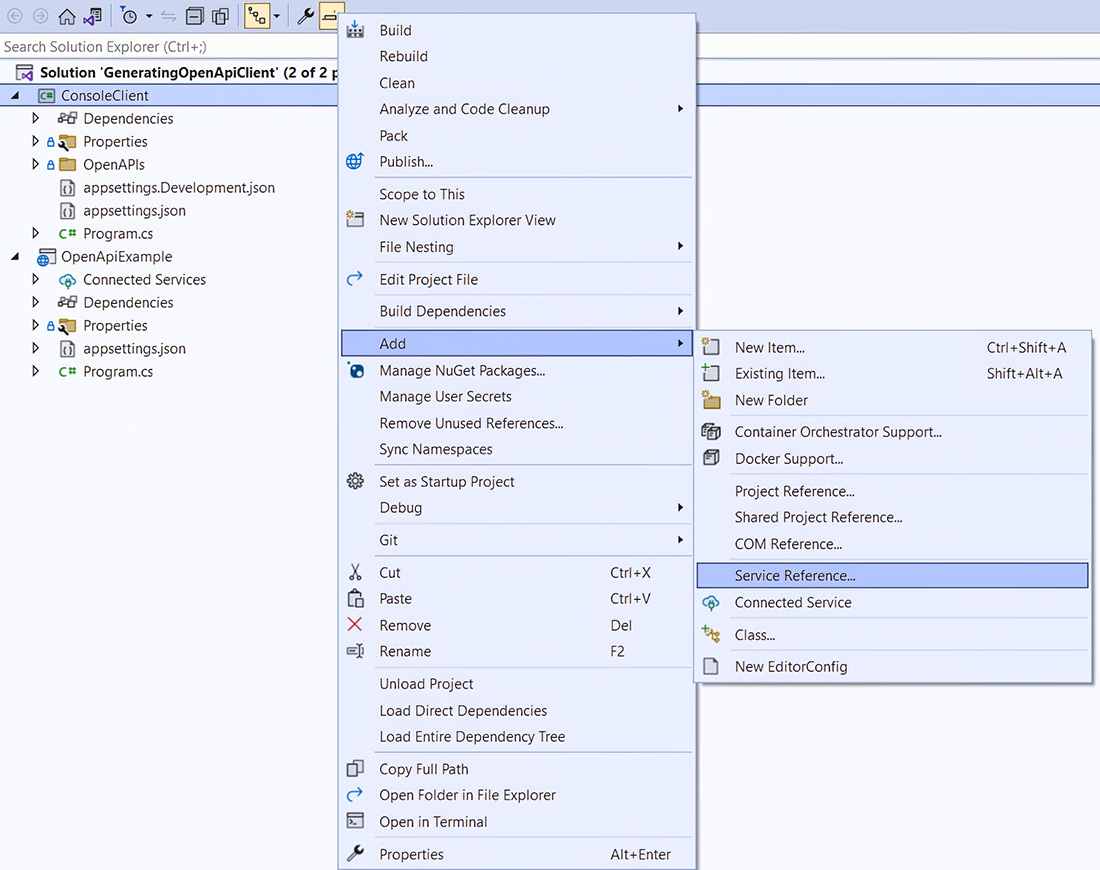
Use the service-reference workflow as a visual checklist for locating the project command that starts OpenAPI client generation. section 11.4.1



