A time window is a bounded interval used to group stream records for time-based aggregation instead of evaluating the entire stream. Kafka Streams defines these boundaries with the windowedBy operator. section 8.3.5 section 8.1.3
Choose the window shape according to how records should overlap and how activity ends:
- Tumbling windows use fixed, non-overlapping intervals; each event belongs to exactly one window, making them suitable for daily order counts. section 8.3.5
- Hopping windows use a fixed size and advance interval; overlapping windows support calculations such as counting logged-in users every five minutes with one-minute advances. section 8.3.5
- Session windows expand with activity and close after an inactivity gap, such as ten minutes without new events. section 8.3.5
- Sliding windows are associated with join operations, while tumbling, hopping, and session windows support the other illustrated windowing cases. section 8.3.5
Kafka Streams assigns records by timestamp and creates windows independently for each key. A grace period delays closure to admit late-arriving data; records arriving after the window end plus that period are discarded. section 8.3.5
Daily order reporting
A stream processor can count orders per region within one-day tumbling windows rather than maintaining one total from the beginning of the stream. The resulting time-bounded view better matches operational reporting needs. section 8.3.5
Figure 8.12 Windowing in Kafka Streams. Brackets show window intervals (W1, W2, …) along the time axis; the icons indicate messages that fall within each window.
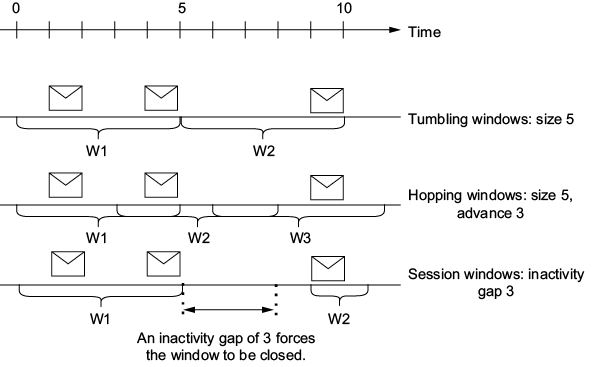
Use the figure to compare fixed, overlapping, activity-based, and time-axis window boundaries. section 8.3.5





