A time window partitions a KStream aggregation into discrete time intervals, so results describe behavior within a useful period instead of accumulating into one ever-growing total. Hourly pizza sales, for example, reveal a lunch rush that a daily total hides. Windowing is available on KStream aggregations, whose records are unrelated events sharing a key; it is not available on KTable aggregations. section 9.0
In Kafka Streams, a windowed aggregation produces a Windowed key. It combines the original key with a Window object holding the aggregation interval’s start and end times. Keep that key with a time-windowed Serde when publishing results, unwrap its underlying key when downstream consumers do not need window identity, or copy the interval into the aggregation value for analysis. section 9.1.1 section 9.1.6
Choose a time-window pattern based on how results should be grouped:
- Use a hopping window for a fixed-duration view that advances more frequently than its size. A one-minute window advancing every 10 seconds overlaps prior windows, which supports comparisons of recent temperature averages. section 9.1.1
- Use a tumbling window for distinct fixed periods. Its advance equals its size, so each event belongs to a non-overlapping interval; omitting advanceBy makes Kafka Streams use that behavior. section 9.1.2
- Recognize alignment differences: TimeWindows align fixed intervals to the Unix epoch, while sliding and session windows derive boundaries from event timestamps. section 9.1.5
Aggregate IoT temperatures by minute
Group a heat-sensor KStream by key, then call windowedBy with TimeWindows.ofSizeWithNoGrace(Duration.ofMinutes(1)). Add advanceBy(Duration.ofSeconds(10)) to report a rolling one-minute view every 10 seconds, or omit advanceBy for separate one-minute tumbling results. Aggregate the readings, convert the resulting KTable with toStream(), and inspect windowedKey.window().startTime() and endTime() alongside each aggregation. section 9.1.1 section 9.1.6
Figure 9.22 Windowed aggregations wrap the key in a Windowed class that contains the key and the Window of the aggregation.
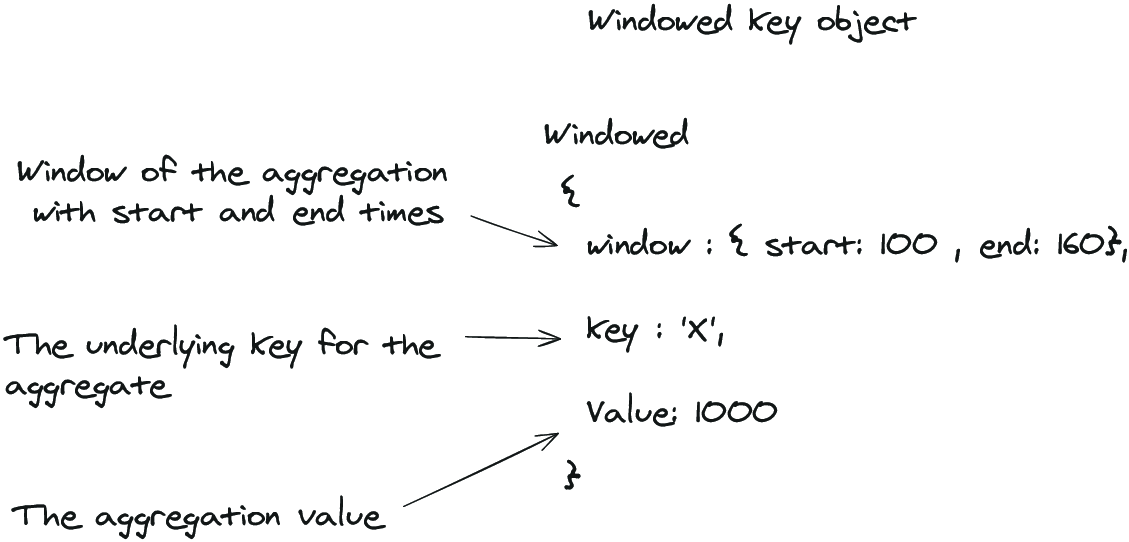
Use the windowed-key diagram to see why an aggregation’s output key carries both the original record key and its associated time interval. section 9.1.6





