A window defines the current scope of events used by a stream-processing query. Instead of treating each record independently, it frames a time-bounded sequence as events arrive, so aggregate functions such as count, average, and sum can calculate across multiple events. The sequence remains ordered by arrival over time; it is not a sorted relational table. section 8.4 section 8.3
Windows make event occurrences usable as metrics or derived signals. A query can count events, calculate an average, recognize that something happened too often or too rarely, and emit a new event from that result. Without a window, aggregation operates on only the current event, so a count returns 1 and a sum reflects that single record rather than the buffered history. section 8.10 section 8.3
Choose the window type based on the required detail and processing cost:
- A hopping window refreshes at a configured hop frequency. Consecutive windows can include some of the same events, producing smoother aggregate changes and more granular analysis, but requiring more computation. section 8.4.1 section 8.10
- A tumbling window is the other supported stream-processor type. It has different cost and performance implications from hopping windows. section 8.10
Sum events over a hopping window
Use a 4-second hopping window advanced every 2 seconds to sum values from the random-num tag: SELECT now(), sum(rand_value) FROM TAG:'random-num' WINDOW HOPPING (4 SECOND, ADVANCE BY 2 SECOND); With a dummy input emitting rand_value 2 once per second, the first completed result is 8 after four events. The following result can be 12 because the next calculation retains overlapping events while incorporating new ones. section 8.4.1
Set duration in hours, minutes, or seconds, then size buffering for both normal traffic and failure surges. Too little buffered data can produce empty windows; too much can exhaust memory. Keep source timestamps stable across daylight-saving changes and use a common time zone. When local time matters, carry it explicitly in the event payload. section 8.4.3
A window also appears in throttling, where it controls the number of intervals used to calculate an average release rate. For example, a rate of two events every two seconds with a window of three intervals evaluates the average over six seconds. Throttling drops events once the configured rate is exceeded, so it protects backends but does not guarantee which events are retained. section 7.5.1
Figure 8.2 Visualization of a sliding or hopping window in terms of how it sees the data
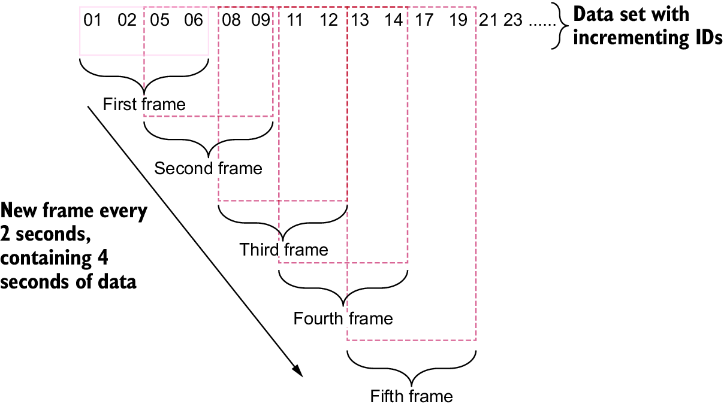
Visualize a hopping window as a moving frame: each refresh presents a new time slice that can overlap the preceding slice. section 8.4.1





