Asynchronous programming starts work that happens outside the CPU—such as file or network I/O—and frees the current thread instead of making it wait. The system later notifies the program so processing can continue when data is available. section 1.3 section 1.6
The practical advantage is resource efficiency rather than automatic speed. A single thread can begin one request, yield during a file read, and work on another request; this can keep applications responsive and let servers handle higher loads with fewer resources. section 1.1 section 6.5
C# async/await lets code retain a linear logical shape while the compiler transforms it into continuations that resume after asynchronous operations. The continuation may run later, often on another thread, so asynchronous flow is not the same thing as creating a new thread. section 3.0 section 3.1 section 1.6
Apply asynchronous programming when the operation spends significant time waiting:
- Keep desktop user interfaces responsive while long operations run, then update the UI after awaiting completion. section 6.2
- Start multiple independent I/O operations and await their completion instead of assigning a blocked thread to each operation. section 5.1 section 8.1.3
- Propagate asynchronous control through callers; avoid replacing await with Task.Wait or Task.Result, which can reintroduce blocking and cause deadlocks or API failures. section 6.3.1
- Control re-entry and shared state when users can trigger operations concurrently, such as disabling a button during an awaited request. section 6.3.2
Asynchronous file processing
A synchronous file-read loop can occupy threads while storage responds. An asynchronous version starts each read with File.ReadAllBytesAsync, awaits the read, processes the result, and awaits Task.WhenAll for the group. Task.Run is useful when actual computation must run on thread-pool threads, but wrapping blocked I/O in separate tasks wastes threads. section 5.1
Figure 1.4 Single-threaded asynchronous web server with three web requests
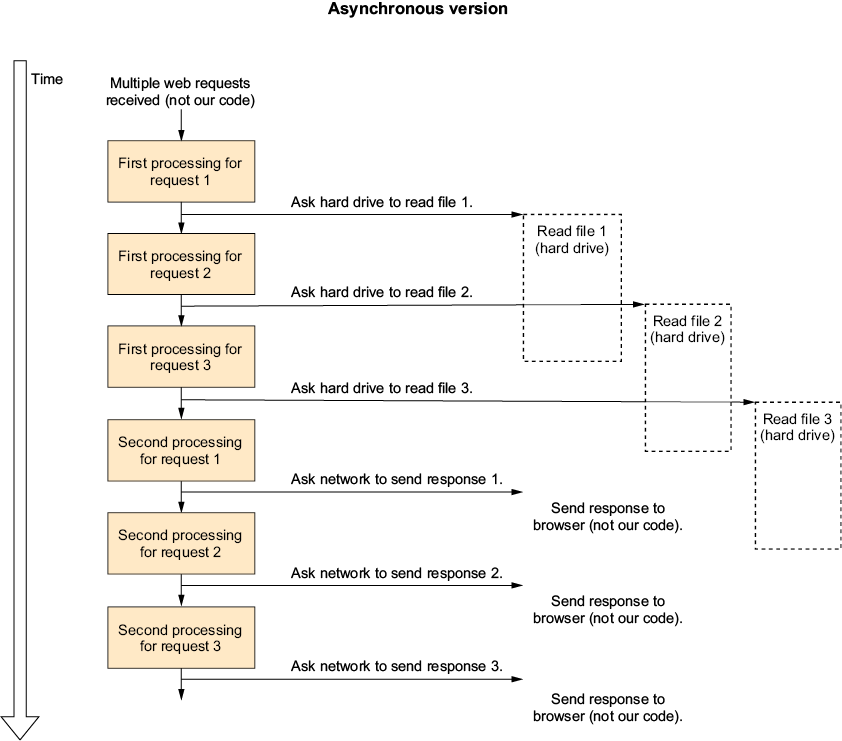
Compare the single-threaded asynchronous request flow with synchronous and multithreaded alternatives to see how work is divided around I/O waits. section 1.3



























