Asynchronous programming lets an application start work that may take time, then continue handling other work instead of blocking while it waits. It is especially useful around external I/O, long-running background work, and workloads that can be divided and run in parallel. The goal is practical responsiveness and throughput, not making every function concurrent. section 12.0 section 12.1.1
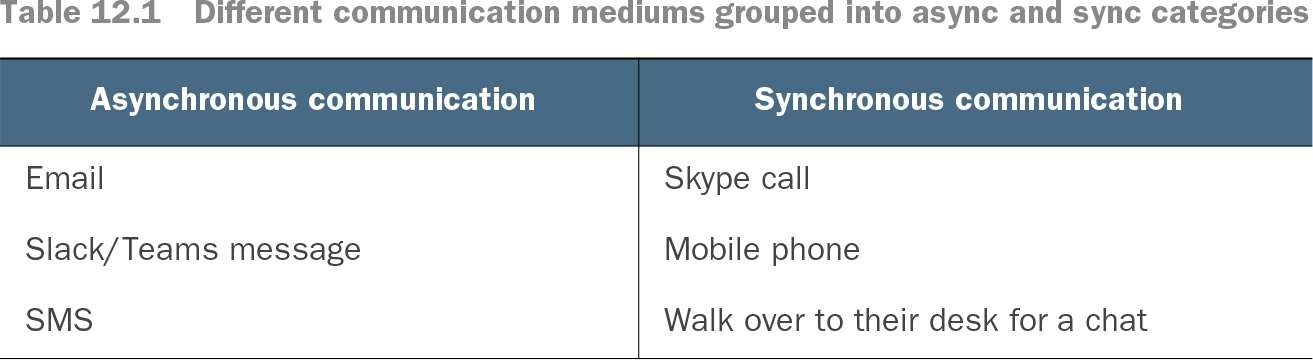
Table 12.1 Different communication mediums grouped into async and sync categories (view table figure)
Compare communication styles by asking whether an immediate reply is essential. Email, messages, and SMS illustrate delayed responses; calls and in-person conversations illustrate synchronous interaction. section 12.1.1
A synchronous database call holds its executing thread until data arrives. An asynchronous call releases that thread while the external operation runs; once it completes, the application resumes the remaining work. This matters for web servers, where a finite pool of threads must serve many requests without sitting idle on database or HTTP waits. section 12.1.2 section 12.2.1
Choosing an asynchronous database call
For a complex query, keep validation and data reshaping synchronous, but use an asynchronous boundary API such as ExecuteSqlAsync rather than ExecuteSql. While the database is working, the application can use its thread for another request; the returned result then continues through the normal business pipeline. section 12.2.1 section 12.4
On .NET, Task is the standard asynchronous abstraction. F# also has Async, so both styles exist: Task originated on .NET, while Async predates it in F#. Use task { } as a general-purpose starting point, while recognizing that async { } remains a distinct abstraction with its own trade-offs. Within these workflows, let! and do! await asynchronous values; Task.WhenAll and Async.Parallel run workloads in parallel. section 12.2 section 12.4
Figure 12.2 Most I/O operations will have asynchronous APIs; your business logic will typically be synchronous in nature, but the boundaries of your application will introduce asynchronous operations, which you can compose together using task { } blocks.
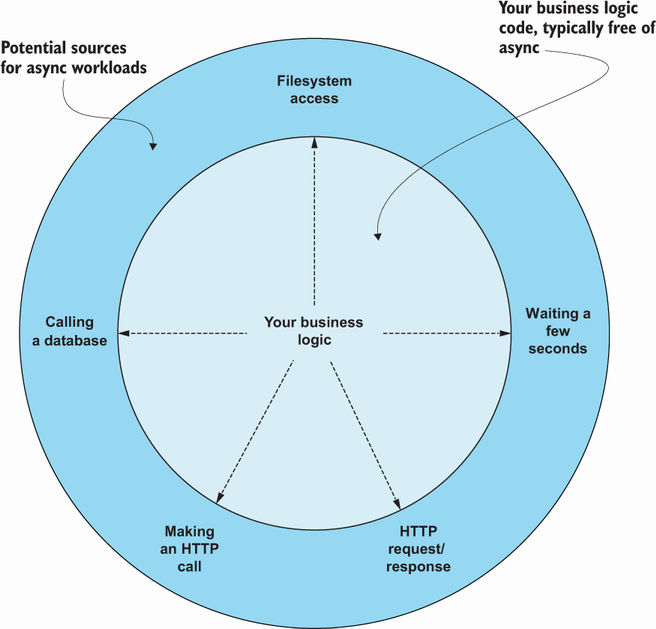
Use this boundary view to separate mostly synchronous business logic from I/O-facing code, then compose the asynchronous operations in task { } blocks. section 12.2.1
Async work splits initiation from eventual completion, so coordination and error handling can become difficult when done manually with callbacks or event handlers. Avoid treating threads as a substitute for asynchronous I/O: that approach can add thread starvation and memory costs. Prefer immutable values across asynchronous pipelines, because they remove the risk of one thread changing data while another reads it. When shared mutable state is unavoidable, use thread-safe mechanisms such as ConcurrentDictionary, Polly, or MailboxProcessor rather than a global mutable variable. section 12.1.2 section 12.3.1