liveBook · Manning

Border

As explained in Build a Website with ChatGPT

The line or edge surrounding an element's content and padding in the CSS box model.

A border is the line surrounding an element’s content and padding. In the CSS box model, it sits inside the margin and outside the padding, helping define the element’s visible box. section 4.2.3 section 4.5

Add a simple border

To give a navigation area a thin black outline, write: nav { border: 1px solid black; } The declaration combines the border width, line style, and color. section 4.2.3

Figure 4.6 The syntax of the border property
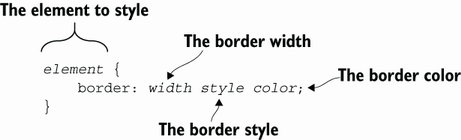
Use the border-property syntax diagram to see how a border declaration is assembled. section 4.2.3


How Build a Website with ChatGPT covers it

How deep it goes
Explains the border’s box-model position and demonstrates one shorthand declaration with width, style, and color.
Examples
Uses a navigation element styled with a 1px solid black border.
What it assumes
Starts from invisible element boxes and teaches content, padding, border, and margin as their four parts.
What you can do after
Apply borders through CSS declarations that specify width, line style, and color.
How it connects
Connects borders to the CSS box model, content, padding, and margin.

Also explained in

Compare how 5 books explain border →

Related concepts

This explainer was generated by Manning's knowledge graph from the text of Build a Website with ChatGPT. The section links point to the parts of the book it draws on.


