liveBook · Manning

Border

As explained in Web Design Playground

The line that surrounds the outer edge of an element's padding box and separates it from surrounding space.

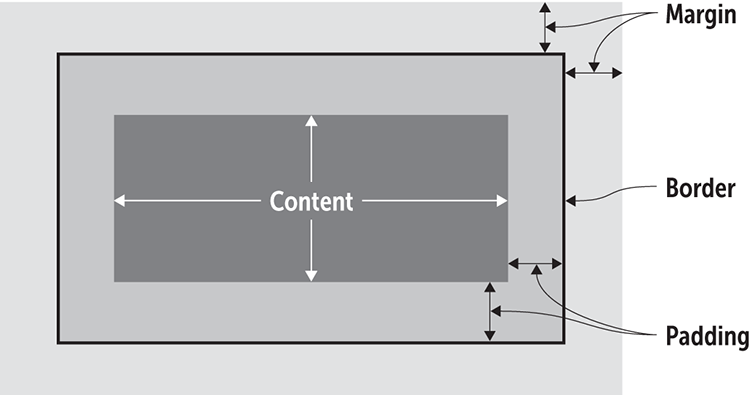
A border is the optional line around an element’s padding. Think of it as a frame: it surrounds the content and padding, then separates them from the margin and nearby page content. section 9.1 section 9.8

Build a border rule from three small choices:

  • Width: choose a measurement such as px, em, rem, vw, or vh, or use thin, medium, or thick. section 9.8
  • Style: choose dotted, dashed, solid, double, groove, ridge, inset, or outset. section 9.8
  • Color: choose a CSS color name. section 9.8

A simple framed pullquote

.pullquote { border: 1px solid black; } This shorthand sets the border’s width, style, and color in one line. The result is a thin, solid black frame around the pullquote. section 9.8
09_01.png

Use the element-box figure to see how the border sits between padding and margin. section 9.1

How Web Design Playground covers it

How deep it goes
Defines the border’s box-model position and demonstrates shorthand syntax, widths, styles, colors, and a navigation example.
Examples
Uses a pullquote rule, a bordered navigation menu, and figures showing borders around actual element content.
What you can do after
Apply it via CSS to frame content and signal separation with a chosen width, style, and color.
How it connects
Connects borders to the CSS box model, content, padding, margin, width, height, and element positioning.

Also explained in

Compare how 5 books explain border →

Related concepts

This explainer was generated by Manning's knowledge graph from the text of Web Design Playground. The section links point to the parts of the book it draws on.



