A CSS border is the optional line around an element’s padding. It separates enclosed content from nearby content and forms the outer edge before the margin begins. section 9.4 section 9.1
Think of an element as a box: content sits inside padding, the border wraps the padding, and margin leaves space outside the border. Together, these parts form the CSS box model. section 9.1 section 9.7
Build a basic border with the three-part shorthand:
- Write border: width style color. section 9.7
- Choose a width such as 1px, or use thin, medium, or thick. section 9.4
- Choose a style such as solid, dotted, dashed, double, groove, ridge, inset, outset, hidden, or none. section 9.4
- Choose a color using a CSS color name. section 9.4
A simple pullquote border
.pullquote { border: 1px solid black; } This gives the pullquote a thin, solid, black line around it. section 9.4
Bordering a navigation menu
A list can use the same shorthand to make the navigation area look like one self-contained section: ul { border: 1px solid black; padding-top: .75em; padding-bottom: .75em; list-style-type: none; text-align: center; text-transform: uppercase; }
Figure 9.1 The main parts of an element box
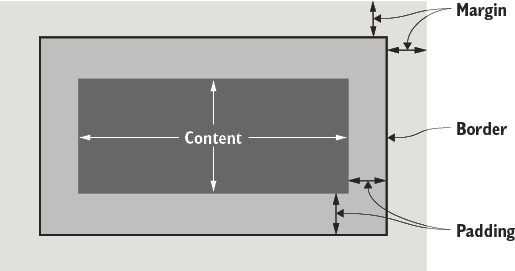
Use the element-box diagram to see how the border sits between padding and margin. section 9.1




