The CSS border shorthand sets an element’s border width, style, and color in one declaration. Its side-specific forms can also use clockwise top, right, bottom, left values. section 1.4 section 1.4.2
Use border shorthand with these practical rules:
- Write values such as `border: 1px solid black`; the browser can identify width, style, and color even when their order changes. section 1.4.2
- Use `border-color` to assign different colors to individual sides, including `transparent` sides. section 6.3.2
- Remember that four-side shorthand values follow top, right, bottom, left; omitted sides reuse values from their opposite sides. section 1.4.2
Create a dropdown arrow with borders
A zero-sized pseudo-element with thick borders forms triangular regions. Keep the top border black and make the other borders transparent to create a down arrow; reverse the colors for an open menu. .dropdown-toggle::after { content: ""; position: absolute; right: 1em; top: 0.9em; border: 0.3em solid; border-color: black transparent transparent; } .dropdown.is-open .dropdown-toggle::after { top: 0.6em; border-color: transparent transparent black; } section 6.3.2
Figure 6.7 When the element has no height or width, each border forms a triangle.
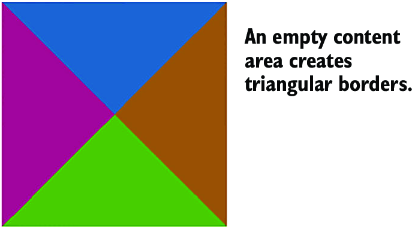
Inspect how shrinking the bordered element to zero width and height makes each border form a triangle. section 6.3.2
Listing 6.10 Absolutely positioning a triangle on the dropdown toggle
.dropdown-toggle {
  padding: 0.5em 2em 0.5em 1.5em;    #1
  border: 1px solid #ccc;
  background-color: #eee;
  border-radius: 0;
}

.dropdown-toggle::after {
  content: "";
  position: absolute;         #2
  right: 1em;                 #2
  top: 0.9em;                 #2
  border: 0.3em solid;                             #3
  border-color: black transparent transparent;     #3
}

.dropdown.is-open .dropdown-toggle::after {
  top: 0.6em;
  border-color: transparent transparent black;    #4
}
View the complete dropdown-toggle rule, including the border shorthand, transparent sides, positioning, and open-state reversal. section 6.3.2




