Brightness—also called value or, in some contexts, lightness—describes how dark or light a color appears. Higher values produce lighter results; lower values produce darker ones. It is one of the three coordinates used to describe colors alongside hue, the color’s position on the spectrum, and saturation, its distance from gray. section 4.2
In HSB (or HSV), brightness runs from 0% to 100%. At 0%, every combination of hue and saturation becomes black: vivid red, pure white, and everything else vanish as though the lights went out. At 100%, the result is not automatically white; only a color with 0% saturation is white. A fully saturated hue at 100% brightness remains a strong pure color. section 4.2.2
Figure 4.17 This demonstration of changing saturation and brightness shows that a brightness of 0 is black, regardless of the saturation (or hue), but a brightness of 100 is only white when the saturation is 0.
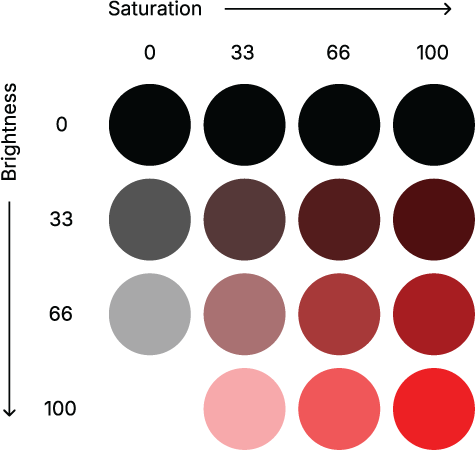
Compare the grid by holding hue steady while changing saturation and brightness: the black bottom edge reveals what brightness at 0% overrides. section 4.2.2
Do not treat HSB brightness and HSL lightness as interchangeable sliders. HSL also reaches black at 0%, but its 100% endpoint is white for every hue and saturation. Its fully saturated “true” hue sits at 50% lightness, halfway between black and white; HSB brightness instead describes a different route through the color space. section 4.2.3
Use brightness or lightness as a practical visual lever:
- Build sequential scales by varying lightness with saturation, so increasing data values remain legible even in grayscale. section 4.3.1
- Avoid losing low data values against the background; a two-hue gradient can improve contrast, but still vary lightness or brightness. section 4.3.1
- Deemphasize text by moving its color toward the background: lighter on light backgrounds, darker on dark backgrounds. section 5.4.1
- Give red and green noticeably different brightness or lightness when a traffic-light palette cannot be avoided. section 4.4.1
Tuning an overemphasized palette
A vivid green can accidentally shout louder than its neighboring categories. Lowering its lightness a few notches can reduce that emphasis without changing its hue. Likewise, a nearly black category may need adjustment when it is too close to a dark blue against a white background. Small changes to saturation and lightness can make a palette more balanced. section 4.3.3






