Brightness is the everyday idea of how light or dark a color looks. In CSS HSL notation, that control is called lightness: a percentage from 0% (black) to 100% (white). Think of it as a dimmer switch for a hue—turn it down for darker shades and up for lighter ones. section 17.1
Use lightness alongside the other two HSL controls:
- Hue selects a position on the color wheel, from 0 through 359. section 17.1
- Saturation controls a hue’s purity; lower values mix in more gray. section 17.1
- Lightness controls apparent darkness or brightness; lower percentages darken and higher percentages lighten. section 17.1
Set a dark purple with hsl()
Give a CSS color as hsl(hue, saturation, lightness). For example, hsl(300, 100%, 25%) uses a purple hue at full saturation with low lightness, producing dark purple text. Change only the final percentage to make that same hue lighter or darker. section 17.4
Figure 17.4 Lightness measures how dark or light a color appears. The color wheel shown previously in Figure 17.3 is set to 50% lightness. Higher percentages produce lighter colors, and lower percentages produce darker colors.
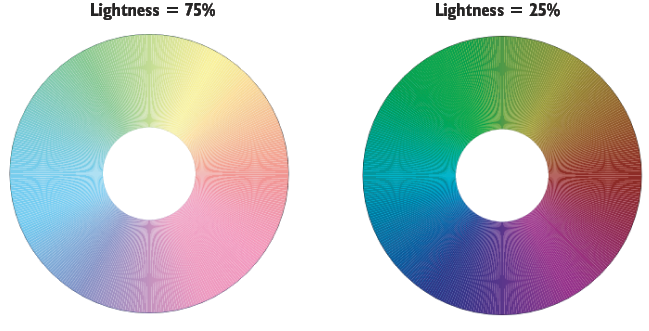
Compare the same color wheel at different lightness percentages: lower values head toward black, while higher values head toward white. section 17.1
When picking colors visually, a color chooser can adjust lightness by dragging vertically in the large color box. It also reveals the resulting hsl() value, so the mysterious-looking numbers do not have to stay mysterious for long. section 17.5
Lightness can also help build a monochrome scheme: keep one hue and vary saturation and lightness to generate several related colors. section 17.7






