A bucket, also called a bin, groups data points within a value range. Distribution charts use these groups to show how often values occur in each bracket; buckets are generally equal-width intervals along an axis. section 6.0 section 6.6
Figure 6.2 To visualize a distribution with D3, we pass the original dataset to function d3.bin(). This function returns a new dataset that includes the bins, their boundaries, and their corresponding data points.
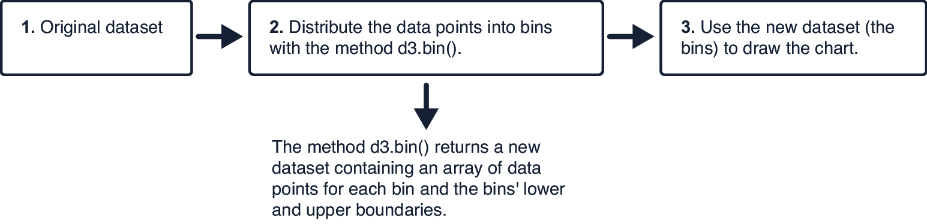
Passing original data to d3.bin() produces bucket arrays together with their lower and upper boundaries and contained data points. section 6.1
A bucket preserves the range that contains a value, not necessarily the exact value. Salary brackets such as $10,000–$19,999 and $20,000–$39,999 are buckets: a response identifies a bracket even when the actual salary is unknown. section 6.1
In D3, turn a numeric dataset into buckets before drawing a distribution chart:
- Create a bin generator and choose the numeric value to group, such as salary. section 6.1
- Run the generator on the data. Each returned bucket is an array of its data points, with x0 and x1 for its lower and upper limits. section 6.1
- Bind the buckets to histogram rectangles. Position each rectangle from x0 and x1, and set its height from the bucket length. section 6.2
- Regenerate buckets whenever filtered data changes, then rebind them to the histogram rectangles. section 7.2.3
Buckets in a salary histogram
For a salary distribution, each rectangle represents one bucket. Its horizontal span matches the bucket’s salary boundaries, while its height is proportional to the number of respondents inside it. Tall rectangles reveal concentrated values; gaps reveal ranges with few or no values. section 6.2 section 6.6
Buckets also provide the structure for violin plots. For each category, bin its values, scale each bucket’s count into a width, and draw a curved area through the bucket tips; mirroring that area produces the violin shape. section 6.5 section 6.6








