Capacity planning estimates the compute, memory, and storage an application will require at a defined future point, usually aligned with a hardware refresh cycle. Treating today’s free disk space as the answer is a costly mistake: capacity must cover projected growth and the surrounding platform, not only current database files. section 9.6
Plan before a production launch and repeat the exercise at each refresh cycle:
- Choose the planning horizon, such as the remaining year in a three-year hardware cycle or the next full cycle. section 9.6
- Estimate future compute, memory, and SAN storage requirements, then determine whether the virtualization cluster and SAN can support them. section 9.6
- Model growth patterns rather than assuming spare space is sufficient; look for linear or exponential growth. section 9.12 section 9.6
- Include transaction log, TempDB, and headroom alongside data-file growth. section 9.6
- Monitor trends after deployment, especially where a single cluster node may need to run every application following failover. section 13.5
Mistake: counting only the free space
Historical Marketing Analysis starts with 200 GB data files and 50 GB free. It ingests 5 GB daily and retains data for three years. Ignoring that rate produces a severe underestimate: after one year, data files reach 1.78 TB before allowing for the transaction log, TempDB, and headroom. The consequence can be unplanned spending or an outage while hardware is procured. section 9.6 section 9.12
Figure 9.5 Linear growth pattern
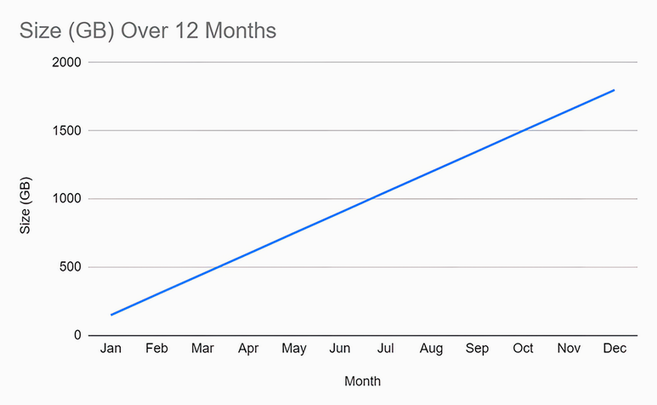
Use the linear-growth pattern as a prompt to translate a steady ingestion rate into future storage requirements. section 9.6
Figure 9.6 Exponential growth pattern
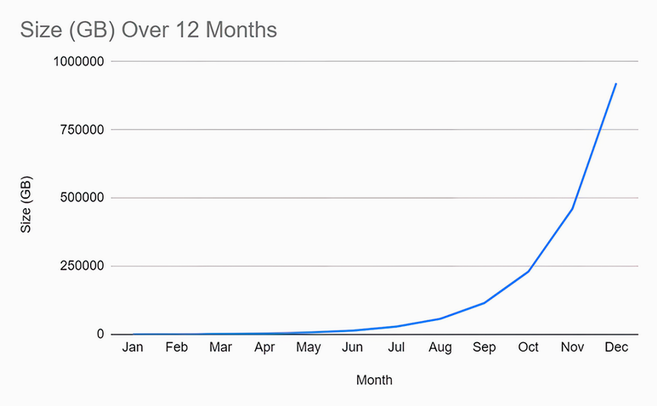
Use the exponential-growth pattern to avoid projecting accelerating demand as though it were steady. section 9.6
Capacity planning is also an availability and cost decision. Test whether Standard edition limits actually constrain the workload before buying Enterprise edition; a large database alone does not establish that need. For clustered workloads, combine planning with DR tests so a failovered node can still deliver acceptable performance. section 8.5 section 13.5


