A certificate authority (CA) is an entity that digitally signs certificates binding public keys to identities or domains. In HTTPS, that signature helps a browser decide whether a server’s public key belongs to the requested website rather than an impostor. section 9.2.1
Trust works through a hierarchy rather than a browser trusting every website directly. Browsers store a relatively small set of trusted root CAs in a trust store; roots may sign intermediate CAs, which sign leaf certificates for domains. section 9.2.1
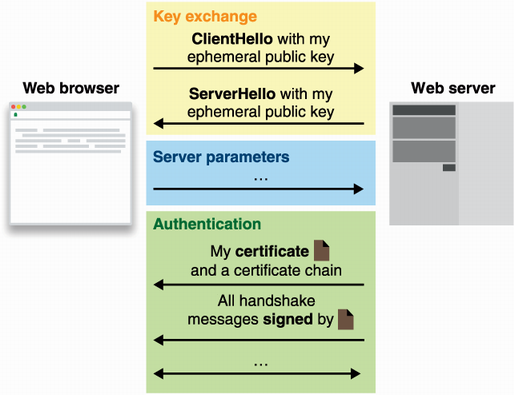
During the authentication part of a TLS handshake:
- The server sends a certificate chain beginning with its leaf certificate, which contains the website’s public key and domain metadata. section 9.2.1
- Each certificate carries a signature from the certificate above it in the chain. section 9.2.1
- The chain ends at a root certificate already trusted by the browser, allowing trust to extend from the root through intermediates to the website. section 9.2.1
Following a real certificate chain
A browser can display a chain for Google: GlobalSign is the trusted root CA, GTS CA 101 is an intermediate signed by that root, and Google’s *.google.com leaf certificate is signed by the intermediate. section 9.2.1
A CA is powerful but not automatically harmless. A misbehaving CA that signs a certificate for your domain with a key it controls could enable impersonation if it also obtains a man-in-the-middle position. Client-controlled systems can instead use their own PKI or pin a specific certificate. section 9.3
Figure 9.6 The authentication part of a handshake starts with the server sending a certificate chain to the client. The certificate chain starts with the leaf certificate (the certificate containing the website’s public key and additional metadata like the domain name) and ends with a root certificate that is trusted by the browser. Each certificate contains a signature from the certificate above it in the chain.
Trace the TLS certificate chain from the website’s leaf certificate to the browser-trusted root, including the signature linking each certificate. section 9.2.1







