Claude is Anthropic’s AI assistant, family of large language models, and platform for working with them. It supports research, design, code, documentation, and operational tasks through a conversation: you provide a prompt and relevant inputs, then review and direct the response. section 1.0 section 1.1
A request can include files or guidelines. Depending on the interface and task, Claude can use tools such as web search or scripts and produce documents or code as well as a response. It does not automatically know your systems, constraints, or priorities; supply those when they matter. section 1.1 section 2.3
Choose an interface for the work:
- Use claude.ai on the web or mobile for cloud-based conversations and uploaded files. section 1.1 section 2.1
- Use Claude Desktop when local content access is needed; access requires your permission. section 1.1
- Use Claude Code as a command-line coding agent, or the developer SDK to build agents for specific tasks. section 1.1
Figure 2.1 How Claude works on the web and mobile — your prompts are routed to the model in Anthropic’s cloud; Claude can search the web and run tools in a temporary sandbox, but has no direct access to your machine or local network. You upload input files and download output files manually.
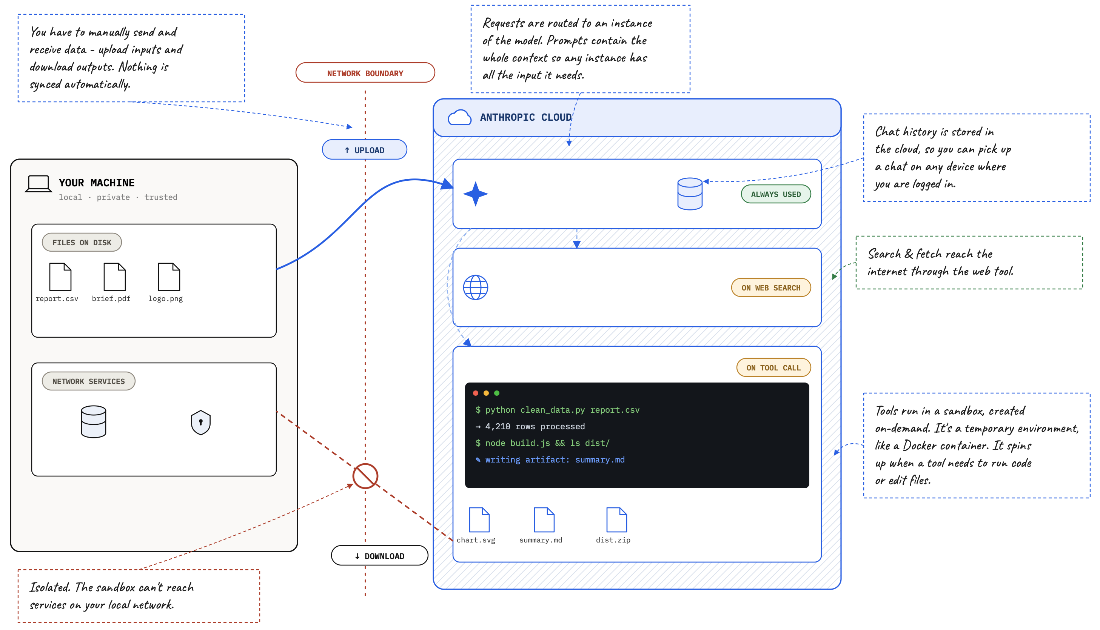
See the web and mobile workflow, including the boundary between cloud tools and your local files. section 2.1
On web and mobile, Claude cannot directly read local files or reach services on your local network. Upload inputs and download outputs you want to keep. Its training data also has a cutoff: specify when recency matters and ask for web research where appropriate. section 2.1 section 2.3
Models trade capability against speed and token consumption. Opus is a choice for complex reasoning, Sonnet for everyday work, and Haiku for lightweight tasks. The model landscape changes, and you can switch models within a conversation. section 1.4.2
Turn a sketch into a design
Upload a rough architecture sketch and start with “What do you make of this?” Then ask about missing components, technology choices, data flows, and availability. Request a design document, review its structure and details, and ask whether it contains enough information to design each component. Revise the document yourself before treating it as finished. section 1.5.1 section 1.5.2
Treat Claude’s output as useful but fallible. If a response looks wrong, push back with specific corrections, logs, screenshots, or documentation. Continue the conversation to check the correction, or start again with a revised prompt or different model. You remain responsible for goals, decisions, and review—even when running several tasks in parallel. section 2.7.2 section 1.6 section 1.3



