Color is a visual-design tool for shaping hierarchy, mood, attention, and first impressions. A palette can make an interface feel cohesive and guide the eye toward an action; competing or overly intense colors can overwhelm people, obscure what to do next, or drive them away. Color works alongside layout, typography, whitespace, and animation rather than replacing a clear page structure. section 1.2 section 9.2.2 section 6.0
Color theory provides practical rules for choosing colors through the color wheel and its relationships. Monochromatic, complementary, analogous, triad, and split-complementary relationships offer starting points when a scheme is hard to choose. Begin with the feeling the interface should evoke, then select colors that support it; emotional associations are shaped by personal and cultural relationships with color. section 9.0 section 9.9
Build and apply a palette incrementally:
- Choose one base color as the primary color used most often across the interface. section 9.4
- Add one or two accent colors, then make usable tints and shades by adjusting lightness and saturation. section 9.4 section 9.9
- Add neutral grays, optionally carrying a hint of the primary color or its temperature for cohesion. section 9.4
- Use 60:30:10 as a starting ratio for balancing color amounts, then adjust after seeing the interface as a whole. section 9.2.2 section 9.4
- Check that contrast directs attention without creating confusion; both clashing excess and too little contrast can weaken a user’s sense of the next action. section 9.2.2
Learn from an existing interface
Save a design that feels effective, place it in a design tool, and use a color picker to reconstruct its palette. Identify the likely color relationship, notice whether it uses tints, shades, or fully saturated hues, and estimate how the colors are distributed. The goal is not an exact percentage calculation but a practiced sense of balance. section 9.2.2
Figure 9.1 Adelson’s checker-shadow is an optical illusion where squares A and B are the same color. (Source: Edward H. Adelson. Licensed under CC BY-SA 4.0)
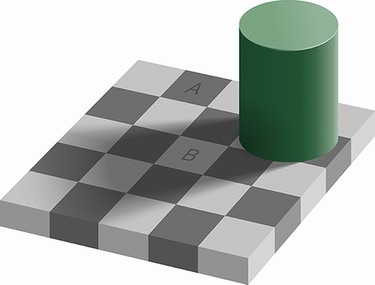
Compare the labeled checkerboard squares side by side: they appear different because of the surrounding shadow, although they are the same color. The illusion shows why perceived color depends on context, not just a sampled value. section 9.0
Accessible color gives people more than a visual cue. Test text colors for readable contrast, and never use color alone to communicate status, severity, importance, or destination. Pair a warning background with an icon or text label, for example, so the meaning remains available to people who cannot reliably distinguish the colors. section 9.6.2 section 9.9



