Color is a visual shortcut: differences in hue, lightness, or saturation can pull attention toward important values and separate categories before a reader consciously starts inspecting the data. That makes it especially useful when a table or chart contains many otherwise similar marks. section 2.1.1 section 2.3
Spotting short bike trips
In a crosstab of average bike-rental duration by hour and weekday, marking values at or below 16 minutes in red turns a hunt through numbers into a visible pattern. Short rides stand out during weekday morning commutes and on Tuesday evenings. section 2.1.1
Figure 2.2 The same crosstab as in figure 2.1, but with the values less than or equal to 16 marked in red
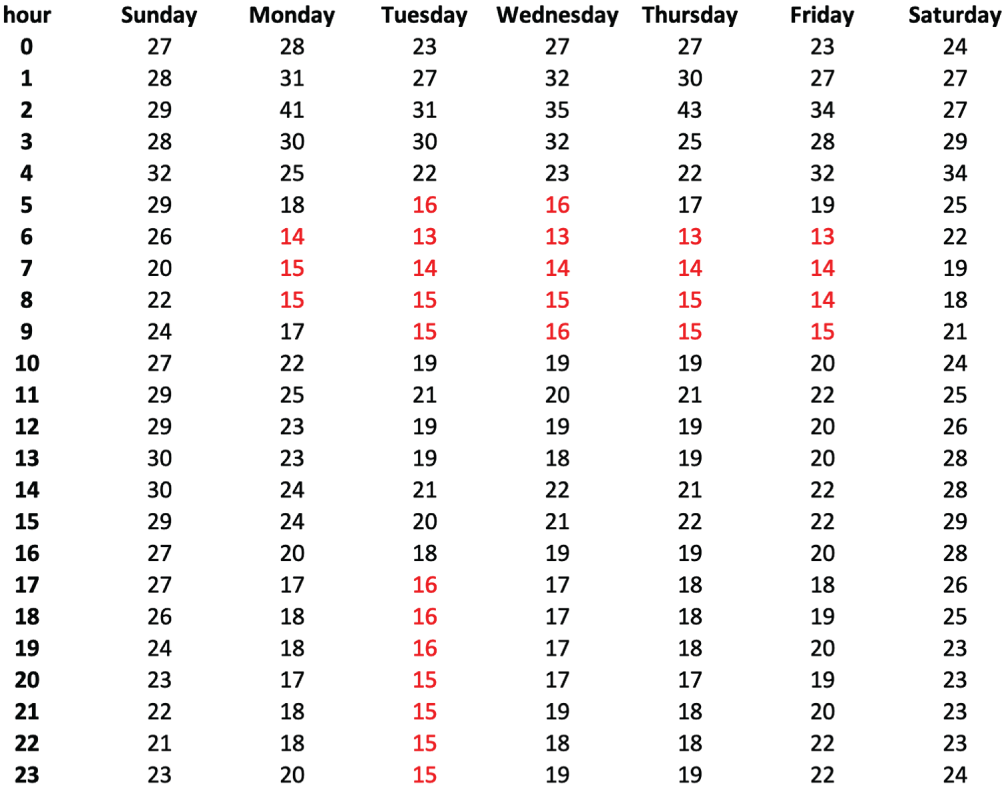
Compare the colored crosstab with its uncolored counterpart to see how a single accent makes threshold values immediately scannable. section 2.1.1
Use color purposefully, not as confetti. It can encode qualitative categories, indicate whether a value crosses a threshold, establish visual hierarchy, or push supporting material into the background. First make the visualization work in black and white; then add only the color needed to clarify the message. section 2.1.1 section 4.3
Match the color approach to the job:
- Use categorical palettes for distinct groups, such as sales regions or statuses. section 2.1.1 section 4.3
- Use continuous palettes—sequential or diverging—for continuous values. section 4.3
- For a crowded view with many categories, keep secondary series in one subdued color and emphasize the focus series with an accent color and heavier form. section 9.2.1
- Use a restrained monochromatic scheme when appropriate: neutral colors can provide structure while one nonneutral color carries emphasis or data. section 5.4.1
Color is not a safe solo messenger. Some people cannot distinguish particular colors, so pair a color cue with another difference, such as font size or form. This matters even more for small text, where accessible contrast is harder to achieve; neutral text colors and controlled lightness changes help maintain readability. section 2.1.1 section 5.4.1
Color works alongside other perceptual signals rather than replacing them. Form is generally better for quantitative magnitude, while spatial position can represent location or a numeric value. Color’s strength is fast attention and categorical distinction; movement should be used sparingly, lest the visualization start shouting. section 2.3 section 2.1.2



