A column is a vertical grouping of one attribute across every row in a table. In a spreadsheet-like table, columns such as Title, Price, and Publication Date organize the same kind of information for each item. A column may also be called a field, although field is not an SQL term. section 2.1 section 2.4
Figure 2.2 The spreadsheet of book titles, with the Title column highlighted to show the vertical nature of columns
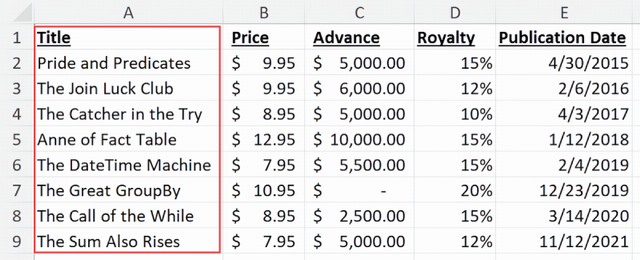
The highlighted Title column shows that a column runs vertically through a table, while each row supplies one value for it. section 2.1
Each row has a representation of every column, and each column position holds a value for that row. A table needs at least one column, but it can have no rows. Some column values may be absent when the table allows that absence; for example, not every person has a middle name. section 2.1 section 2.6
Select one column
To retrieve the Name values from every row of a vegetables table, name the column after SELECT and the table after FROM: SELECT Name FROM vegetables; Column names are commonly singular because each row usually contributes one value to that column. section 2.2
Columns also guide table design and data changes:
- Choose clear, meaningful column names and data types when creating a table. Reusing a name across tables is most useful when similarly named columns have a relationship. section 18.1.1
- Update values as properties represented by columns; an update can affect selected columns or columns across every row. section 17.1
- Add a new column at the end of an existing table by default. Its display order can still be chosen in queries, and rearranging stored columns can require extra resources. section 18.2.2
Columns appear in data diagrams as the named, typed entries inside each table. Similar names such as OrderID and TitleID can help identify related data, while vague names such as ID or Name can become ambiguous in databases with many tables. section 18.1.1 section 18.4.1








