In fraud detection, a community is a group of graph nodes more densely connected to one another than to the rest of the network. A community of linked accounts and shared devices may warrant investigation as coordinated activity, even when individual actions do not cross rule thresholds. Membership alone is not evidence of fraud. section 9.3.3 section 9.1
A practical analysis moves from detection to inspection:
- Run Louvain on a constructed graph and assign each node a `community_id`. A count of detected communities is an output check, not a suspiciousness score. section 9.3.3
- Group nodes by community ID. For each group's subgraph, calculate size and density, then count users, IPs, devices, phones, and cards. section 9.3.3
- Compare the resulting summaries and visualize a selected subgraph to inspect relationships. A density of 1 means every node in that subgraph is connected to every other node. section 9.3.3
Listing 9.3 Applying Louvain community detection
# Ensure NetworkX (nx) is imported and G is the constructed graph from Listing 9.2
# Ensure pandas as pd and display from IPython.display are imported

if G is not None and G.number_of_nodes() > 0:
    print("\nPerforming Louvain community detection...")
    try:
        import community.community_louvain as community_louvain
        partition = community_louvain.best_partition(G, random_state=42, resolution=1.0)
        nx.set_node_attributes(G, partition, 'community_id')
        num_communities = len(set(partition.values()))
        print(f"Louvain algorithm detected {num_communities} communities.")

    except ImportError:
        print("Error: 'community_louvain' library not found. Please install it using 'pip install python-louvain'.")
        partition = None
    except Exception as e:
        print(f"An error occurred during community detection: {e}")
        partition = None
else:
    print("Graph G not available or empty. Skipping community detection.")
    partition = None # Ensure partition is defined
Shows the Louvain call, its `random_state` and `resolution` settings, and how partition IDs become node attributes. section 9.3.3
Figure 9.4 A summary table of the top 5 largest communities detected by the Louvain algorithm, showing their size, density, and the count of different entity types within each
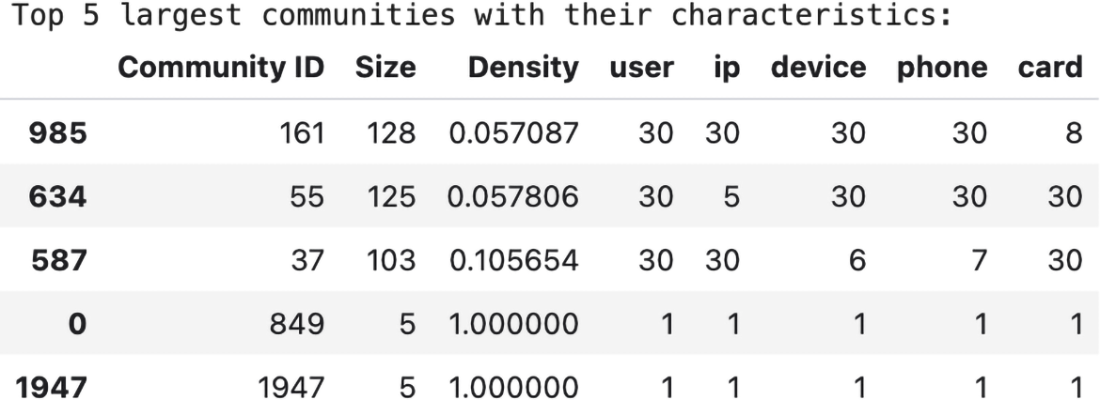
The top-five summary makes community size, density, and entity-type counts comparable before selecting a group for closer inspection. section 9.3.3
Figure 9.5 A visualization of the largest detected community (ID 161). Each node type is represented by a unique shape and color, revealing the relationships and potential bottlenecks within this suspicious cluster.
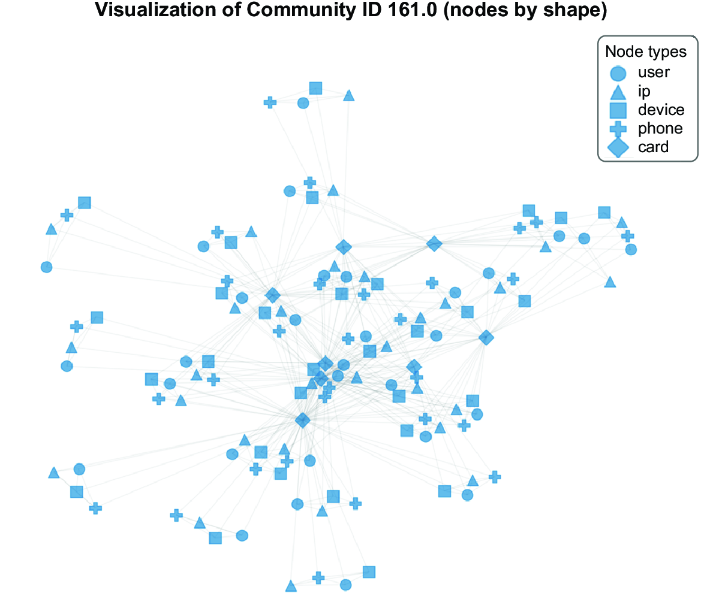
The selected community's node shapes and colors make entity types and relationships visible to an investigator. section 9.3.3