An Elasticsearch cluster is a collection of connected Elasticsearch server instances, called nodes, that work together to store, retrieve, and distribute data. Launching Elasticsearch creates a node that joins a cluster by default; with only that node present, it is a single-node cluster. Index data is divided into shards and replica shards, which are placed across nodes so the system can share work and retain redundant copies. section 3.2.4 section 3.2.5
A cluster grows when additional nodes join with the same cluster.name setting. Nodes can be added on new machines to scale out horizontally, after which Elasticsearch distributes data across them. Adding nodes can raise read throughput and indexing performance; removing nodes can reduce capacity when demand falls. Scaling up instead adds CPU, memory, or RAM to existing machines. section 3.2.5 section 3.6.2 section 14.1
From one node to a resilient cluster
Create an index with one primary shard and one replica on a single-node development cluster. Elasticsearch creates the primary shard but does not place its replica on that same node, because a copy on the same machine would not protect against a machine failure. Add a suitably named node on another server; it joins the cluster and allows shards and replicas to be distributed separately. Use the cluster health API to inspect the state, unassigned shards, node counts, and data-node counts. section 14.1.1 section 3.2.4
Plan a cluster around these operational constraints:
- Use a single-node cluster for development and testing, not as a production-grade arrangement. section 3.2.5 section 14.1.1
- Place nodes on separate dedicated servers when resilience matters; multiple nodes on one server can all be lost in one crash. section 14.1.1
- Avoid placing a replica with its primary shard on the same node, since that defeats redundancy. section 3.2.4
- Forecast capacity before demand arrives, considering data needs, read throughput, indexing performance, and hardware-failure recovery. section 14.1
- Expect production administration to include node communication, shard and replica sizing, backups, configuration, master-role decisions, and stability work. section 14.0 section 15.3
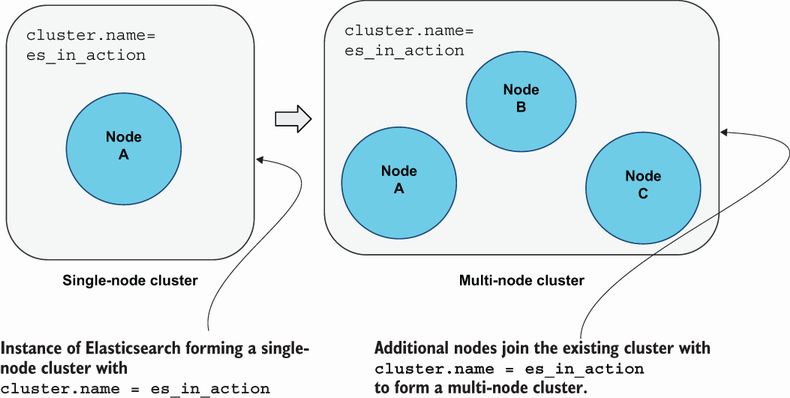
Follow the transition from a single node to a multiple-node cluster and see how nodes combine into one coordinated deployment. section 3.2.5
Clusters support distributed search and storage, but production operation is more involved than starting a server. Growth may require configuration changes, memory tuning, node-failure management, and scaling for very large data volumes. Health and stability matter because an unhealthy cluster can affect its ability to service client requests. section 3.0 section 15.3 section 1.4.5







