Context is the background that lets an AI coding assistant interpret a request: surrounding code, project structure, documentation, constraints, instructions, and prior conversation. Without it, a valid-looking suggestion can still miss the intended behavior, domain conventions, or architecture. section 1.5.3 section 9.2
IDE assistants can gather context automatically from the current file, nearby tabs, code around the cursor, filenames, project paths, frameworks, repository information, documentation, and configuration. Fill-in-the-middle uses code both before and after a target area, helping a completion fit existing logic rather than merely continue preceding text. section 2.1.1 section 2.3
Add context deliberately when asking for help:
- State the task, expected inputs and outputs, constraints, error-handling needs, and desired format. section 1.5.3 section 9.1
- Select enough surrounding code to expose the real problem, but split large or complex requests into focused tasks. section 2.6
- Use clear names, complete directions, and relevant examples or edge cases rather than assuming the assistant can infer intent. section 2.6 section 9.3.1
- Choose only relevant files or artifacts. Sending an entire application can add noise, reduce accuracy, slow responses, and consume token limits. section 10.5.2
From vague request to useful database prompt
A comment such as “Connect to a database” leaves key decisions unspecified. “Connect to a SQLite database. The file name is data/questions.db.” supplies the database type and location, producing a more relevant starting suggestion. Review the result anyway: context improves alignment, not correctness. section 5.3.2 section 2.6
Context also accumulates through dialogue. Start with a clear description, inspect the response, then add missing facts or constraints and compare alternatives. Treat suggestions as drafts: verify them against the current architecture, test each change, and use developer judgment where the tool lacks implicit domain knowledge. section 3.9 section 6.3
Figure 10.4 Different ways to add context in Cursor, offering a range of choices to help you refine your search or decide what to include in your questions
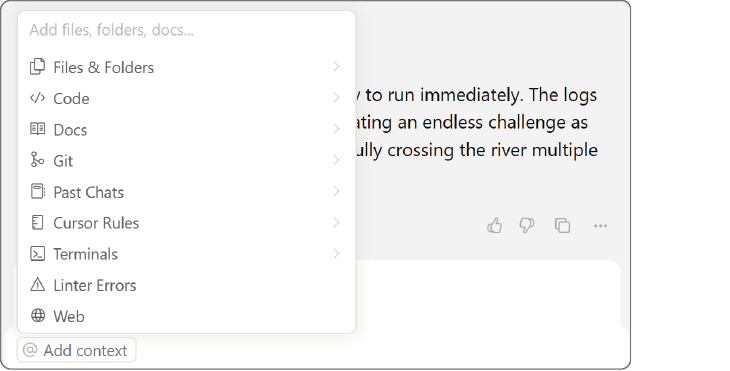
Cursor’s context menu makes context selection explicit, including files, documentation, Git history, chats, rules, terminals, linter errors, and web results. section 10.5.2

















