A dialogue is the ordered exchange of user and AI messages in a chat application. Displaying those messages lets users review earlier answers and ask follow-up questions. Display alone does not give the AI memory: previous messages must also be available as context when a new request is processed. section 2.2.1 section 2.6
Managing a dialogue involves distinct responsibilities:
- Show messages in a scrollable area so users can revisit the exchange. section 2.2.2
- Keep client and server state synchronized without implicitly trusting client-provided messages. One possible design keeps recent messages on the client for display and the full history on the server for context. section 4.0
- Persist messages under a session ID when users need to reopen conversations or switch between threads. Retrieve the appropriate history before processing a new message. section 6.3 section 10.3.1
The distinction matters in a minimal chat app: its interface can update the message list after every response, yet a reload loses the exchange if it is not stored. If earlier messages are not sent with a new request, the backend cannot use them as conversational context. section 2.2.1 section 2.6
Use earlier messages in a LangChain.js exchange
Create a ChatMessageHistory from past SystemMessage and HumanMessage instances, attach it to BufferMemory, and invoke a conversation chain. After asking for an example of AI, a follow-up such as “What did I just ask you?” tests whether the earlier turn remains available. For a persistent application, first retrieve the messages for the session from storage; in-memory history alone does not supply persistence. section 6.3
Figure 6.6 Managing user messages to improve conversation accuracy. Messages are retrieved from a database, stored with a unique session ID, and converted into a ChatMessageHistory format. This history is used to create a ConversationChain that handles user queries, using stored context to enhance response accuracy. The history is integrated into other prompts to refine the model’s performance.
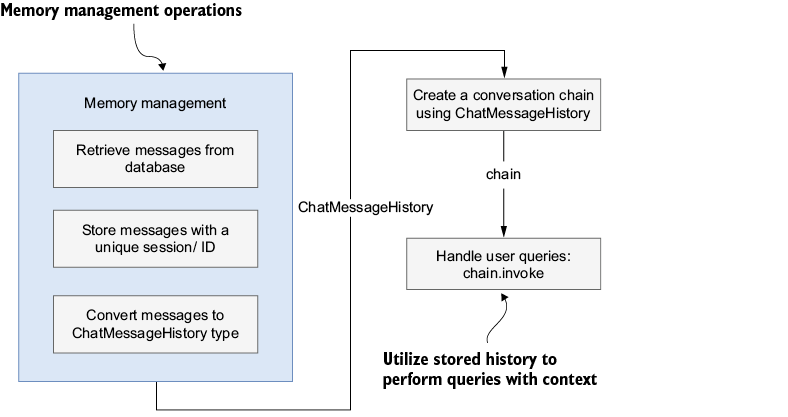
Trace how session-identified messages move from storage into chat history and then into a chain that uses them when answering a new query. section 6.3
Stored dialogue is also user data. Before retaining it, assess whether messages contain personal, financial, or medical information; plan encryption, least-privilege access, retention and deletion, and access auditing. If users need past conversations, provide a way to retrieve them by ID and navigate to them. section 9.5 section 9.6.6









