A CPU cache is small, fast memory that stores data near the processor. Modern CPUs use multiple cache levels: nearer caches are smaller, faster, and more expensive than larger, slower levels. section 3.4
Caches matter because DRAM access can stall execution. An L1 cache may respond in approximately one nanosecond and hold up to 100 KiB, while the last-level cache (LLC) reaches megabytes or tens of megabytes with roughly an order-of-magnitude higher latency. section 3.4 section 11.4
Apply the hierarchy when optimizing latency:
- Keep the application’s working set comfortably within the LLC when low latency is the priority. section 3.4
- Treat cache misses as potential execution stalls; out-of-order and speculative execution can hide some memory-access latency but do not eliminate it. section 11.4
- Place data and CPU work near the relevant NUMA node because local memory access is faster than remote access on NUMA systems. section 3.4
Latency-sensitive working set
A low-latency service benefits when its frequently accessed data fits within the LLC rather than repeatedly reaching DRAM. Hardware may continue along a predicted path during a memory stall, committing the work when prediction succeeds and discarding it when prediction fails. section 3.4 section 11.4
Figure 3.4 UMA and NUMA architectures. The left side of the figure represents a UMA architecture where all CPU cores have the same access latency to DRAM. The right side represents a NUMA architecture with two nodes. CPUs that are in the same node can access NUMA node local memory faster than memory in a remote node.
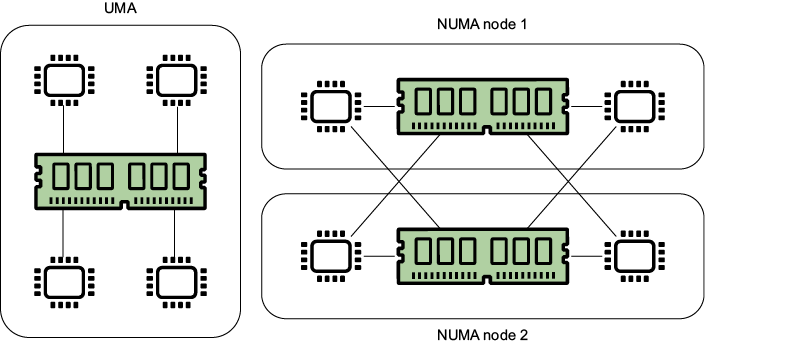
Compare UMA and NUMA layouts to understand how CPU proximity and memory placement affect access latency. section 3.4


