liveBook · Manning

CSS box model

As explained in Acing the Frontend Interview

The CSS box model defines an element's rendered dimensions and spacing through its content, padding, border, and margin areas.

A CSS element has four layers: content at the center, then padding, border, and an outer margin. In a frontend interview, use these layers to explain both an element’s dimensions and the space around it. section 2.2

Calculate a div’s dimensions

A div has a 100px content width, 30px left and 10px right padding, and 5px left and 3px right borders. Its total width under the content-plus-padding-plus-border calculation is 148px. Its corresponding height is 81px: 50px content, 5px and 20px padding, and 2px and 4px borders. The example’s margin is zero. section 2.2

Figure 2.6 CSS box model, where the content box is at the center, surrounded by padding. The border wraps around the padding, and the margin forms the outermost layer, creating space between elements.
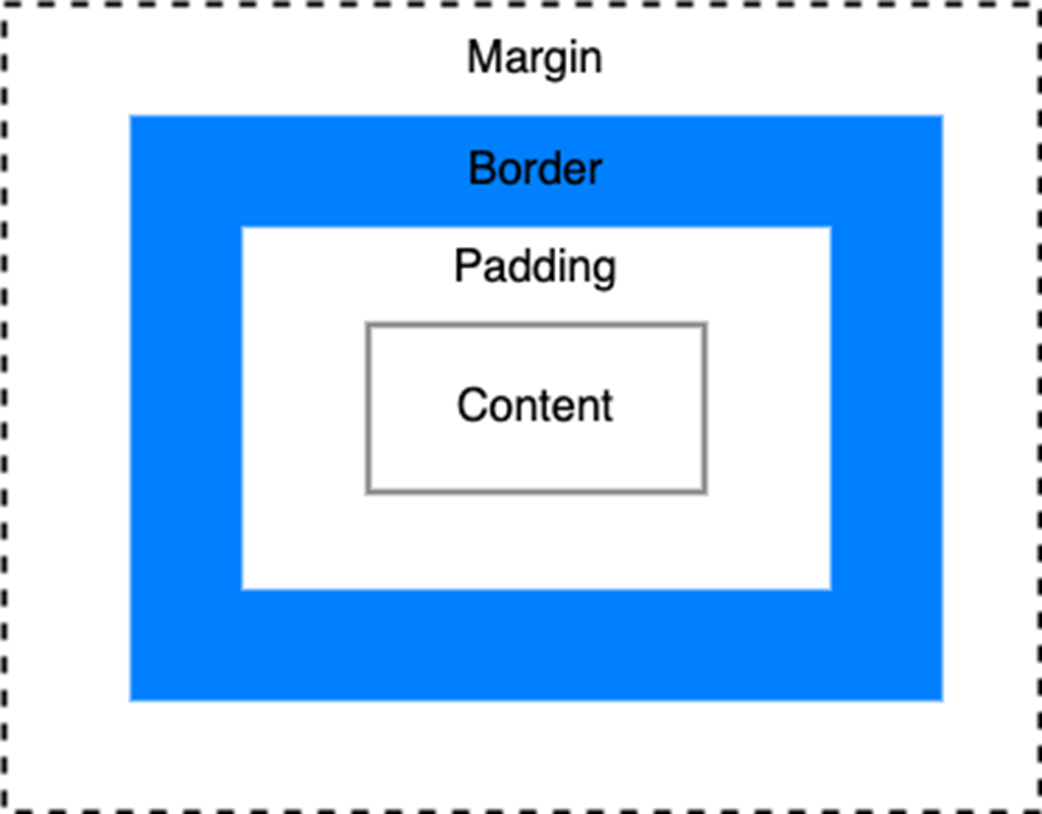
Use the diagram to locate each layer before calculating dimensions or explaining spacing between elements. section 2.2


How Acing the Frontend Interview covers it

How deep it goes
Defines four layers and gives width and height calculations, without exploring browser internals.
Examples
Calculates dimensions for a div with specified width, height, padding, borders, and zero margin.
What it assumes
Assumes familiarity with basic CSS declarations while illustrating the box layers from the center outward.
What you can do after
Practice/perform dimension calculations from content size, padding, and borders while distinguishing the outer margin.
How it connects
Connects CSS sizing with padding, borders, margins, and spacing between elements.

Also explained in

Compare how 7 books explain CSS box model →

Related concepts

This explainer was generated by Manning's knowledge graph from the text of Acing the Frontend Interview. The section links point to the parts of the book it draws on.