CSV is a delimited text format for tabular data. In graph workflows, it commonly stores edge lists or adjacency-list data, but headers, labels, and arrangement must match the receiving system. section 8.3.1 section 8.3.2
A practical pipeline extracts raw records, transforms them into a chosen graph schema, saves the result as CSV, and loads it for exploration or preprocessing. CSV is selected here because Python can manipulate it easily. section 8.3.2
Using CSV for graph data typically involves these steps:
- Define which entities are nodes, which relationships are edges, and which values are properties. section 8.3.1
- Convert source data into an edge list or adjacency list that satisfies the target schema. section 8.3.2
- Load the CSV into NetworkX for exploratory analysis and visualization, or into PyG for preprocessing. section 8.3.2
- Check formatting explicitly: a CSV edge list with particular headers may be interpreted differently by different systems. section 8.3.1
Relationship data to an edge-list CSV
A relationship dictionary can be transformed into rows containing source and destination nodes. The transformation tracks nodes, writes each connection, and avoids repeating an undirected edge before saving the edge-list file. section 8.3.2
Figure 8.9 A graph with nodes and edges marked (top). An edge list representation (middle); each entry contains the edge number and the pair of nodes connected. An adjacency list representation in a dictionary (bottom); each key is a node, and the values are its adjacent nodes.
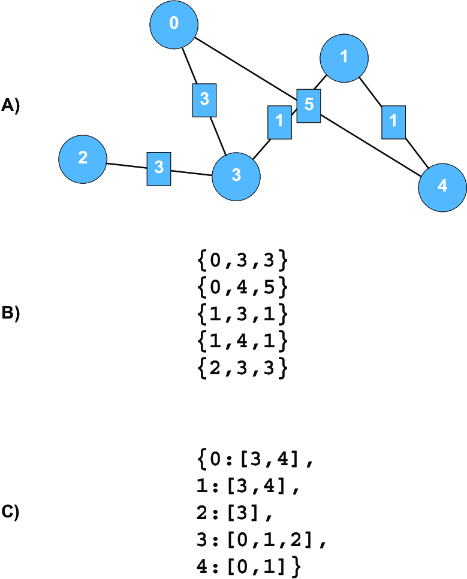
Compare a graph with its edge-list and adjacency-list representations before choosing the CSV structure to write. section 8.3.2
Listing 8.2 Create an edge list from relationship dictionary
def create_edge_list(data_dict, suffix=''):
    edge_list_file = open("edge_list_{}.txt".format(suffix),"w+")
    edges = []
    nodes_all = []

    for source in list(data_dict.keys()):
        if source not in list_of_nodes_all:
            nodes_all.append(source)
        connections = data_dict[source]

        for destination in connections:   #1
            if destination not in nodes_all:
                nodes_all.append(destination)

           if {source, destination} not in edges:   #2
               print(f"{source} {destination}")
               out_string =  f"{source} {destination}\n”
               edge_list_file.write(out_string)   #3
               edges.append({source, destination })

           else: continue

       edge_list_file.close
       return list_of_edges, list_of_nodes_all
Inspect the implementation pattern for writing source–destination pairs and filtering repeated undirected edges. section 8.3.2














