liveBook · Manning

CSV

As explained in Pandas Workout: 200 exercises to make you a stronger data analyst

A delimited text file containing tabular data, typically encoded using the CSV format.

CSV is a plain-text way to represent a two-dimensional table: file rows correspond to data rows, and commas separate columns by default. Because text files can be read and edited without special tools, CSV is a common format for downloading datasets and sharing analysis results. Its apparent simplicity hides variation: CSV has no formal specification, and delimiter, headers, indexes, and other conventions can differ between files. section 3.0

In pandas, `pd.read_csv` creates a new DataFrame from CSV input, while `df.to_csv` writes a DataFrame as CSV. Reading is deliberately configurable so that the parser can match the file rather than assume every producer made the same choices. section 3.0

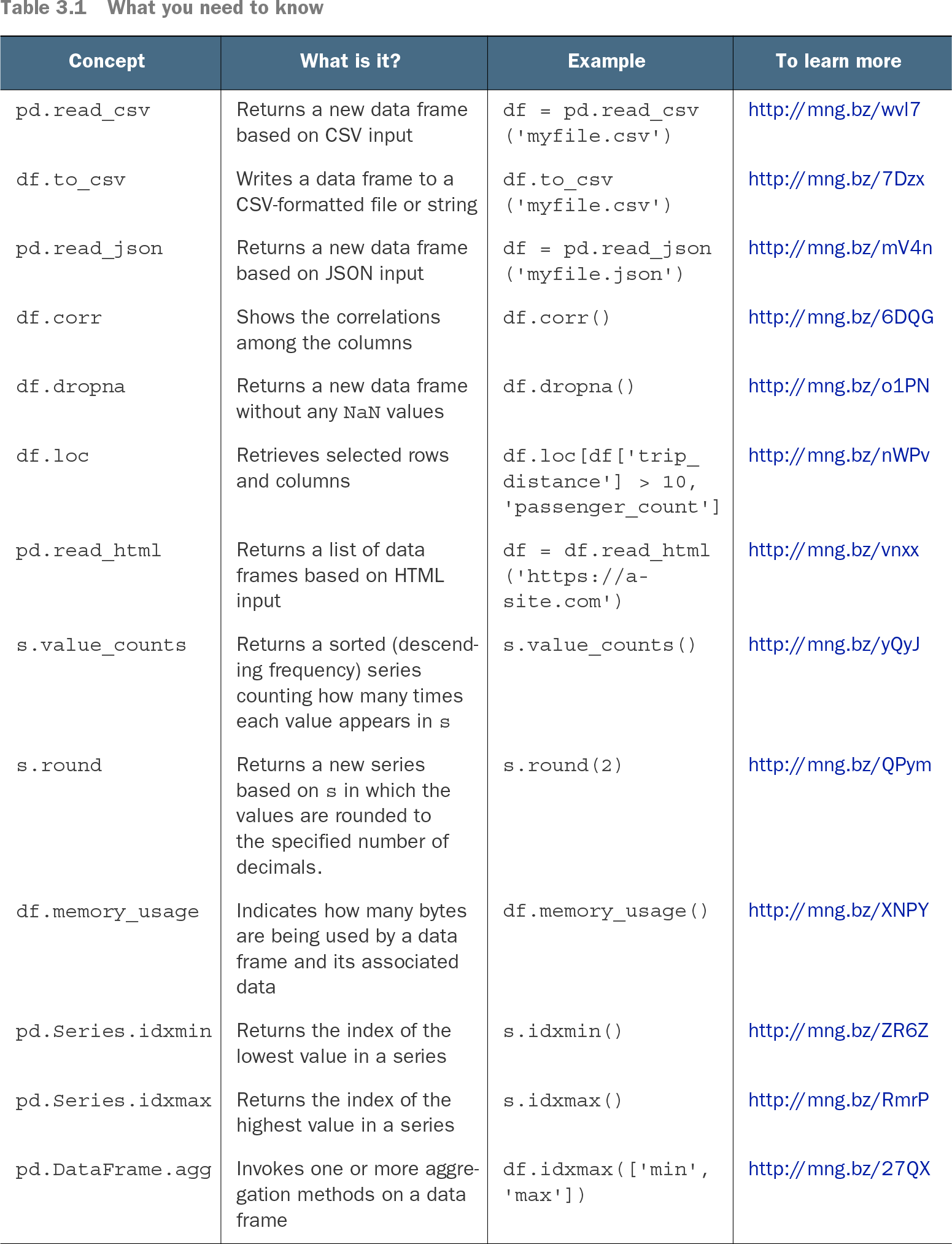
Table 3.1 What you need to know (view table figure)

Concept

What is it?

Example

To learn more

pd.read_csv

Returns a new data frame based on CSV input

df = pd.read_csv('myfile.csv')

http://mng.bz/wvl7

df.to_csv

Writes a data frame to a CSV-formatted file or string

df.to_csv('myfile.csv')

http://mng.bz/7Dzx

pd.read_json

Returns a new data frame based on JSON input

df = pd.read_json('myfile.json')

http://mng.bz/mV4n

df.corr

Shows the correlations among the columns

df.corr()

http://mng.bz/6DQG

df.dropna

Returns a new data frame without any NaN values

df.dropna()

http://mng.bz/o1PN

df.loc

Retrieves selected rows and columns

df.loc[df['trip_distance'] > 10, 'passenger_count']

http://mng.bz/nWPv

pd.read_html

Returns a list of data frames based on HTML input

df = df.read_html('https://a-site.com')

http://mng.bz/vnxx

s.value_counts

Returns a sorted (descending frequency) series counting how many times each value appears in s

s.value_counts()

http://mng.bz/yQyJ

s.round

Returns a new series based on s in which the values are rounded to the specified number of decimals.

s.round(2)

http://mng.bz/QPym

df.memory_usage

Indicates how many bytes are being used by a data frame and its associated data

df.memory_usage()

http://mng.bz/XNPY

pd.Series.idxmin

Returns the index of the lowest value in a series

s.idxmin()

http://mng.bz/ZR6Z

pd.Series.idxmax

Returns the index of the highest value in a series

s.idxmax()

http://mng.bz/RmrP

pd.DataFrame.agg

Invokes one or more aggregation methods on a data frame

df.idxmax(['min', 'max'])

http://mng.bz/27QX

Use this quick reference to distinguish CSV input with `pd.read_csv` from CSV output with `df.to_csv`, alongside related data-cleaning and analysis operations. section 3.0

Start by inspecting the file’s shape and conventions, then set the arguments that describe it:

  • Set `sep` when fields use a delimiter other than the default comma, such as a tab. section 3.0
  • Choose an index column, restrict imported columns with `usecols`, and specify whether a header row is present. section 3.0
  • Ignore comments and blank lines, supply column names, and choose an index when importing a colon-delimited Unix passwd-style file. section 3.12
  • Load compressed `.csv.gz` files directly when pandas can automatically handle gzip compression. section 13.3

Investigate unusual taxi rides

Load only `passenger_count`, `trip_distance`, `payment_type`, and `total_amount` from a January 2019 taxi CSV. With the resulting DataFrame, count rides with more than eight or zero passengers, cash rides costing over $1,000, negative totals, and rides whose distance is below average while cost is above average. Selecting columns during import keeps the task focused on the fields needed for the questions. section 3.1

Compare two periods from separate files

Read July 2019 and July 2020 taxi CSV files, retain passenger count, total amount, and payment type, and attach a `year` value identifying each file. Combine the data to compare ride counts, total collections, multi-passenger trips, and cash payments across the two years. section 3.5

CSV files can also be inputs to larger analyses. Load separate institutional and fields-of-study datasets, selecting the columns needed for each, then combine DataFrames when a question needs facts from both sources. Import choices therefore shape later grouping, joining, memory use, and visualization work. section 13.3 section 13.2


How Pandas Workout: 200 exercises to make you a stronger data analyst covers it

How deep it goes
Explains CSV’s ambiguous conventions through configurable parsing tasks, without prescribing one canonical file format.
Examples
Practices taxi-ride anomaly queries, cross-year taxi comparisons, passwd-file parsing, and college-scorecard analysis.
What it assumes
Assumes familiarity with DataFrames and moves directly to importing real datasets rather than creating them manually.
What you can do after
Apply it via pandas `pd.read_csv` to load varied delimited files and select the fields needed for analysis.
How it connects
Connects CSV to pandas DataFrames, `pd.read_csv`, `df.to_csv`, indexes, grouping, joins, and gzip compression.

Also explained in

Compare how 15 books explain CSV →

Related concepts

This explainer was generated by Manning's knowledge graph from the text of Pandas Workout: 200 exercises to make you a stronger data analyst. The section links point to the parts of the book it draws on.