A default gateway is the router a host uses to reach devices in other LANs. The host relies on it when the destination is not on its local network. section 4.1
A host typically needs these network parameters:
- IP address identifies the host for sending and receiving packets. section 4.1
- Netmask distinguishes local-LAN destinations from destinations requiring the default gateway. section 4.1
- DNS server address translates human-readable domain names into IP addresses. section 4.1
- DHCP can lease the default gateway and these other settings automatically, avoiding large-scale manual configuration. section 4.0 section 4.1
Viewing a configured gateway on macOS
Run netstat -rn and inspect the default route. In the example, the Gateway column shows 192.168.1.1, identifying the router used as the MacBook’s default gateway. section 4.3.2
Figure 4.1 R1, a DHCP server, leases IP addresses to clients PC1 and PC2. In addition to IP addresses, clients learn their netmask, default gateway, and DNS server addresses. R1 keeps track of leases and when they expire.
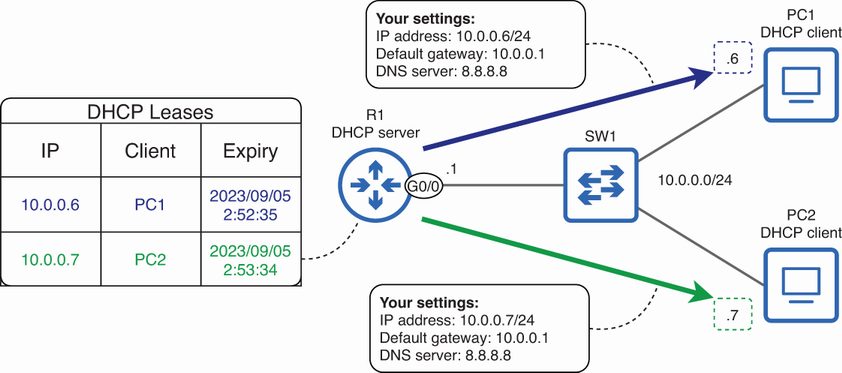
A DHCP router can lease clients their IP addresses, netmasks, default gateway, and DNS server addresses while tracking lease expiration. section 4.1

