A default gateway is the router a host uses to send packets outside its local network. Hosts on the same network communicate directly without using the gateway. section 9.1 section 9.4
When a host sends traffic to a remote destination:
- The host compares the destination IP address with its own network and determines that the destination is outside the local network. section 10.1.1
- It keeps the remote destination in the packet but addresses the local Ethernet frame to the gateway interface's MAC address. section 9.1
- ARP discovers the gateway's MAC address; the gateway then examines the packet, selects a routing-table entry, and forwards it in a new frame. section 9.2 section 10.3
PC1 sends to PC3
PC1 at 192.168.1.11 sends to PC3 at 192.168.2.11. Because the networks differ, PC1 sends a frame to R1's G0/0 MAC address. R1 routes the packet and sends a new frame toward PC3's MAC address. A common gateway address is 192.168.1.1, although the gateway need not use the first usable address. section 9.1
Figure 10.2 PC1 uses ARP to learn R1 G0/1’s MAC address. (1) PC1 sends an ARP request to 192.168.1.1. SW1 learns PC1’s MAC address and floods the frame due to the destination MAC address of ffff.ffff.ffff. (2) After receiving the ARP request, R1 adds an ARP table entry associating IP address 192.168.1.11 with PC1’s MAC address. R1 then sends an ARP reply to PC1. SW1 learns R1 G0/1’s MAC address and forwards the frame to PC1. (3) After receiving the ARP reply, PC1 adds an ARP table entry associating IP address 192.168.1.1 with R1 G0/1’s MAC address.
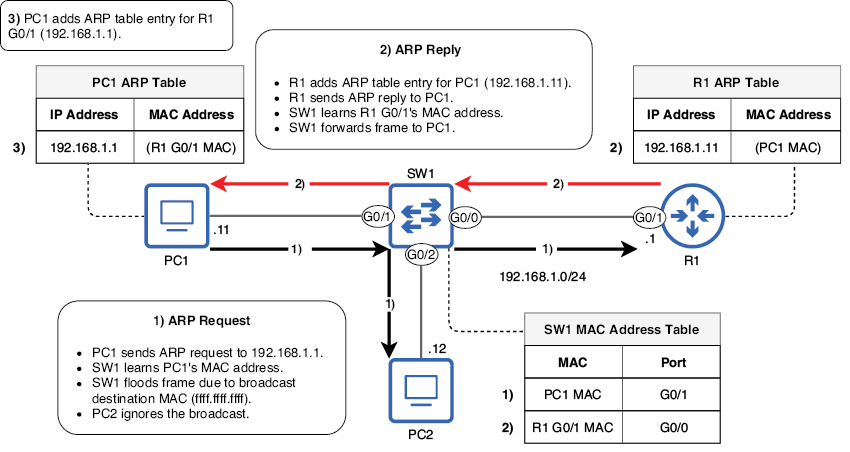
Follow the ARP exchange in which PC1 requests 192.168.1.1, R1 replies with its interface MAC address, and both devices update their ARP tables. section 10.1.1
Administrators can configure a gateway manually, but user devices commonly learn it through DHCP. On Windows, ipconfig displays the IPv4 address, subnet mask, and default gateway. Do not confuse a host's default gateway with a router's default route: a router's 0.0.0.0/0 route forwards destinations that match no more-specific route. section 9.1 section 9.3.2

