Developer experience (DX) is the quality of the tools and workflows used to build, test, and debug software. Treat it as one resource to balance—not the goal itself: choose tools around project needs and prioritize user-facing goals such as usability, accessibility, and performance. section 1.4
A Vanilla Web workflow can use whichever tools fit the project:
- Choose an editor and server setup: options include VS Code with an npm-based server, WebStorm with Apache, a basic text editor, or a cloud-based coding assistant. section 2.5
- Edit, test, and debug in the browser with Chromium DevTools Workspace; add a local server or live reload when useful. section 2.5
- Deploy source without changes when no build tools are needed, or add lightweight tools such as ESLint, Prettier, Lighthouse CI, Axe Core, WebHint, or Playwright. section 2.5
AI-assisted workflow
Simple project structures can give LLM-based coding agents shorter context, helping them work faster and more accurately on coding, testing, or debugging. section 1.4
Figure 2.11 In Chromium’s DevTools, you can define your Workspace in Sources to edit your source code directly from the browser, eliminating the need for an IDE or code editor.
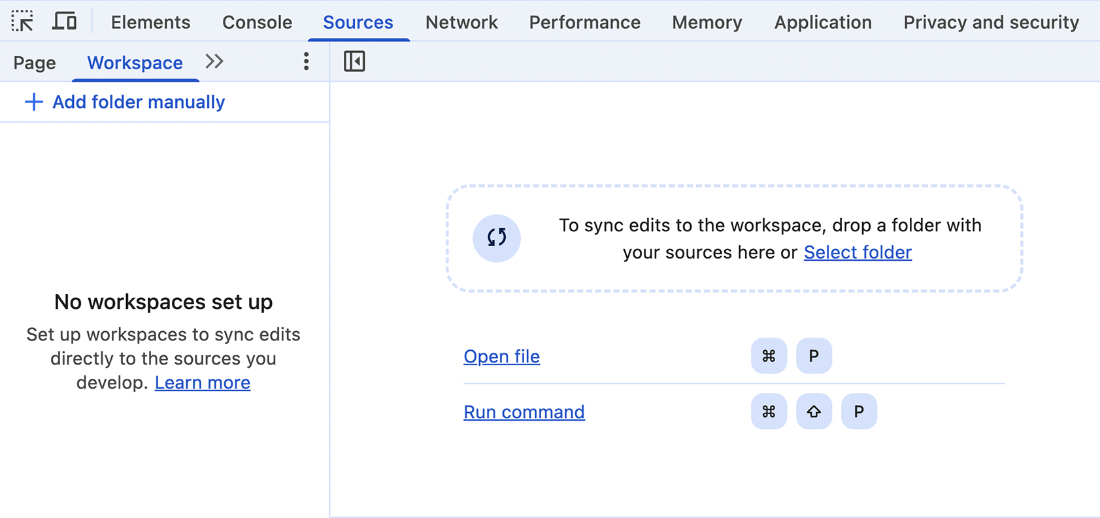
Chromium DevTools Workspace can edit project source from the browser, supporting a code-test-debug cycle without leaving it. section 2.5