A diffusion model generates an image by starting with pure noise and removing a little noise at each step. Think of it as a denoising autoencoder used repeatedly: one pass makes a small improvement; the full loop can turn noise into a new image. “Reverse diffusion” is the more precise name for this direction, because diffusion itself means gradually adding noise. section 17.2
Figure 17.7 Reverse diffusion: turning pure noise into an image via repeated denoising
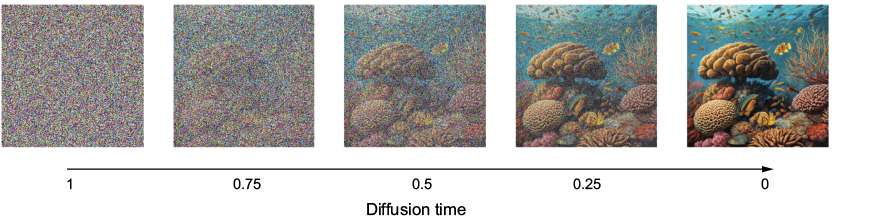
Follow the sequence from pure noise to a recognizable image; the intermediate images make the repeated-denoising idea concrete. section 17.2
For a concrete example, an unconditioned model trained on the Oxford Flowers dataset generates new flower images without a text prompt. Its denoiser runs at successive diffusion times. Here, time 1 marks the noisy start of generation, while time 0 marks an image that is almost entirely signal. section 17.2.3 section 17.2.7
Three practical pieces organize the loop:
- Denoiser: remove a small amount of noise from the current image, then repeat. section 17.2
- Diffusion time: identify the current step, from the noisy start toward the finished image. section 17.2.3
- Diffusion schedule: map time to noise and signal rates. The worked implementation uses cosine and sine so the squared rates sum to 1. section 17.2.3
In the flower implementation, training uses Keras with AdamW, learning-rate decay, and an exponential moving average of weights to help stabilize training. Generated images are plotted after each epoch and model weights are checkpointed. This is a build-it-yourself route for unconditioned image generation; realistic results can improve with longer training. section 17.2.7 section 17.1.1
To guide the result with words, encode a prompt as a text embedding and give it to the denoiser alongside the noisy image. Training on prompt–image pairs then makes it possible to start from noise and generate an image for a new prompt. Training a strong text-to-image model from scratch is expensive, so a practical alternative is the pretrained Stable Diffusion 3 model through KerasHub’s TextToImage task. Its generation call also accepts a negative prompt and a chosen number of diffusion steps. section 17.3
Rule of thumb: use diffusion when realistic generated images are the goal; use a pretrained text-to-image model when prompt control matters more than building the model yourself. Treat the output as generated imagery, not reliable evidence: denoising-based image enhancement can hallucinate details. section 17.4 section 17.2









