An iterative design loop is a repeatable way to improve a website or web application: identify a user problem, research it, design and build a solution, test whether it works, and refine it when it does not. For ongoing products, the cycle continues after release; for smaller projects, the same phases can be used once or repeated as needed. The goal is not to polish an early guess, but to keep checking that the product meets real user needs efficiently. section 1.2.1 section 3.4.1
Figure 1.3 The iterative process this book covers for a web design or web application project—from identifying the problem to user research, user experience design, design and build phase, and test and evaluate

Follow the cycle from problem identification through research, UX design, design and build, then testing and evaluation. A failed evaluation sends the work back into refinement rather than treating launch as the finish line. section 1.2.1
A practical loop connects each decision to evidence:
- Start with the problem, target audience, and user need. Check whether the proposed problem is genuinely worth solving. section 1.2.1 section 3.4.1
- Turn business requirements and user goals into page layout, content placement, and user flows before committing to detailed visuals. section 1.2.1
- Design and build together where possible. Structure can be agreed on first, while color, images, typography, animation, and code are developed and adjusted as decisions evolve. section 1.2.1
- Evaluate with users or other appropriate feedback. If the result does not meet needs, investigate why and begin another research, design, testing, and development cycle. section 1.2.1 section 3.4.1
Iteration works best when developers participate early rather than receiving a finished handoff. Development knowledge can expose an impractical feature before it creates waste, while a developer’s perspective can influence the creative direction. This makes visual design, user experience, and implementation shared work instead of isolated stages. section 1.1 section 1.2.1
Test before expensive rework
Imagine building a web application from assumed user needs, wiring the backend to the interface, and showing it to users only near launch. Interviews then reveal that users wanted something different and struggle to navigate the site. The team must redesign the interface and architecture, delaying launch and increasing cost. Earlier research, prototypes, and user testing can validate assumptions sooner and reduce the scale of later changes. section 4.1.1
Testing is not reserved for one moment. Early tests can use lower-fidelity designs while user flows are still being worked out. Later tests remain valuable when mock-ups are nearly complete, but the test should match the current question: validate a flow early, or check whether a more complete design achieves its intended result later. section 11.0
Figure 3.4 The user-centered design process starts with identifying a user need you are trying to solve and then moves on to how users are going to utilize what you provide, identifying the requirements needed to solve the use case, building a design solution, and evaluating whether the design fulfills the user’s need. If the process does not satisfy the user’s need, it restarts.
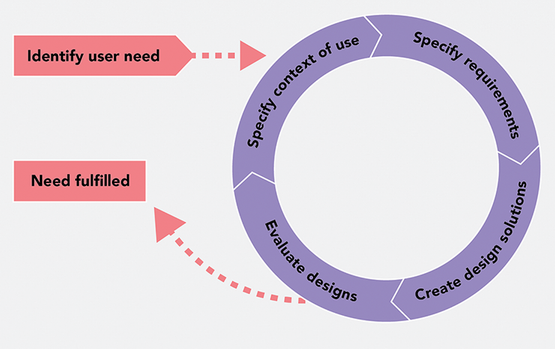
Use this user-centered cycle to connect feedback to the next action: understand users and requirements, create a solution, evaluate it, and restart when the need is not satisfied. section 3.4.1


























