Raw metrics are useful for machines but awkward to read during an investigation. Grafana turns metrics stored in Prometheus into dashboards, making application behavior easier to inspect. In this setup, Prometheus periodically scrapes a Quarkus application’s `/q/metrics` endpoint; Grafana queries Prometheus rather than the application directly. section 10.3.5 section 10.3.6
To visualize metrics from an Inventory service:
- Add Prometheus-format Micrometer support with `quarkus extension add micrometer-registry-prometheus`, then start the service in Dev mode. section 10.3.6
- Check the exported data at `/q/metrics`, for example with `http :8083/q/metrics`. Quarkus supplies metrics when Micrometer is enabled; `# HELP` and `# TYPE` lines describe them. section 10.3.6
- Start the supplied `docker-compose-metrics.yml` setup with `docker compose -f docker-compose-metrics.yml up`. Grafana is available at `http://localhost:3000` and Prometheus at `http://localhost:9090`. The supplied setup avoids having to configure the two tools from scratch. section 10.3.6
From a metric to a chart
The exported `process_uptime_seconds` gauge reports JVM uptime, while a Grafana view can show JVM memory usage over time. Application-specific metrics can also be collected: annotating a registration method with `@Counted(description = "Number of car registrations")` produces a `method_counted_total` value after a successful registration. These metrics provide a starting point for investigating performance or tracking application usage; Grafana is the visualization layer, not the collector. section 10.3.6 section 10.7 section 10.3.5
Figure 10.7 Visualizing JVM memory usage in Grafana
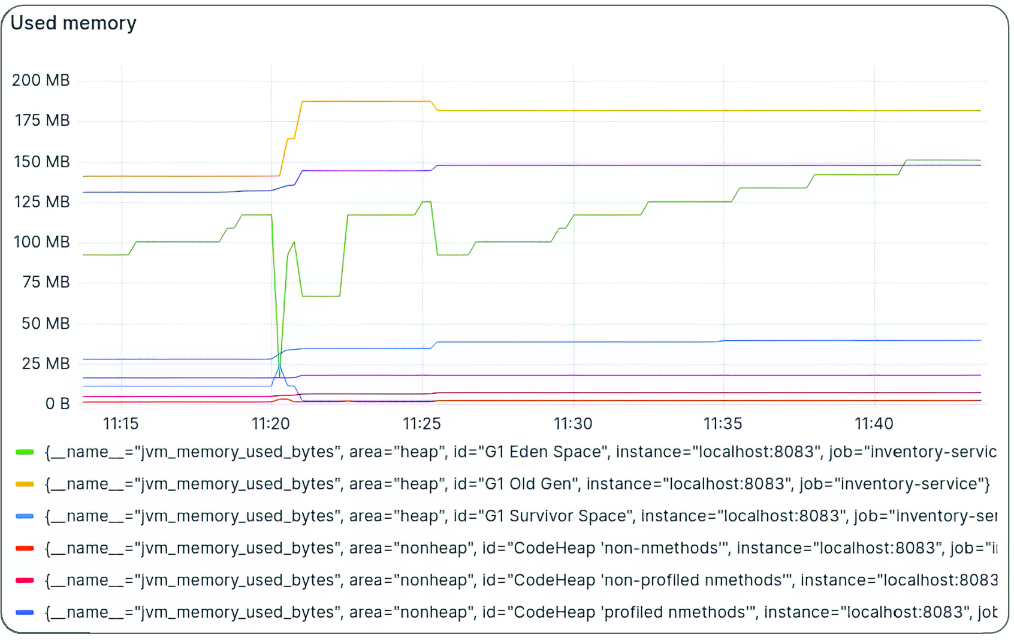
See how JVM memory usage appears as a Grafana visualization rather than raw endpoint output. section 10.3.6
Grafana is also identified as an alerting tool, but this workflow demonstrates visualization rather than alert configuration. The supplied Docker Compose file handles the local Prometheus–Grafana setup; its configuration details are not developed here. section 10.8 section 10.3.6








