Grafana is an open-source visualization tool that pulls metrics from data sources such as Prometheus and displays them through dashboards, graphs, and other visual widgets. In a ScyllaDB monitoring stack, it provides preconfigured views of cluster performance. section 11.1 section 11.1.3
Grafana dashboards provide progressively more specific views:
- Overview shows traffic, latency, and availability at a high level. section 11.1.3
- Detailed examines reads, writes, compaction, tombstones, and other performance metrics. section 11.1.3
- Keyspace reports table-level metrics, while OS Metrics reports underlying node performance. section 11.1.3
- Scylla CQL shows query volume and performance; Advanced exposes scheduling groups, I/O queues, and commit logs. section 11.1.3
Viewing query activity
After running read queries against the cluster, open localhost:3000/dashboards and choose the Scylla CQL dashboard. A burst of reads appears as a spike in the CQL Reads graph. Check the axis units: 800 milli-operations per second equals 0.8 operations per second. section 11.1.3
Figure 11.1 Prometheus pulls metrics from your database nodes, which are used by the downstream components to provide visualizations and alert notifications.
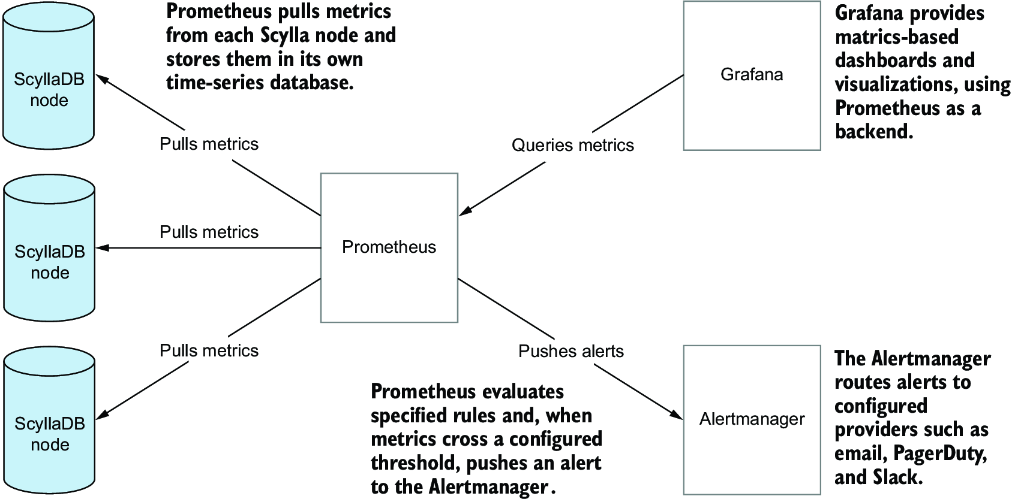
Trace how Prometheus collects metrics from database nodes and Grafana turns them into dashboards, while Alertmanager handles threshold notifications. section 11.1








