HTML is the browser-facing format of a web page: it tells the browser how to render text, images, and interactive elements for people. Unlike JSON, SQL results, or CSV files, it is not a dependable data-exchange format. Data needed by a pipeline may be nested in elements, mixed with navigation and ads, and organized differently from page to page. section 10.1
For scraping, HTML is the evidence from which fields must be extracted. An HTTP response supplies a status code, headers, and page content; after a successful 200 response, the content can be held as a raw string. That page source commonly contains scripts, stylesheets, analytics, cookie banners, and navigation alongside the product data, so reading it directly is usually noisy. section 10.5.2
A practical HTML-inspection workflow is:
- Open the product page and identify fields worth extracting, such as a product name, price, description, images, or specifications. section 10.4.3
- Use browser developer tools and the selector tool to connect visible page content to its underlying tags, classes, and attributes. section 10.4.3
- Parse the retrieved page into a BeautifulSoup object, then print all or part of the parsed structure before choosing selectors. section 10.6
- Write extraction logic for the structure actually found, and account for variants such as sale and regular price elements. section 10.6
Extracting a product title and price
A product page can expose its title in an h1 and its price within div.product-block__price. After parsing the HTML, find the h1, select the price block, then prefer span.price-item--sale when it exists; otherwise use span.price-item--regular. Each lookup can return no element, so the extraction should leave a field unset rather than assume the selector always matches. section 10.6
Selectors are site-specific because HTML structure varies across retailers and manufacturers. Inspecting every new site, locating fields, and maintaining matching extraction logic can be manageable once but costly across many products. This variability motivates later AI-assisted extraction and URL-selection work, while keeping inspection as the basis for verifying what is present. section 10.4.3 section 10.6
Figure 10.2 Understanding a webpage's underlying structure is essential for effective data extraction. This view shows a GORUCK product page alongside its HTML source in the browser's developer console, revealing the complex nested elements, class names, and data attributes that encode product information like pricing, color variants, and sizing options. While humans can easily interpret the visual presentation on the left, programmatically extracting that same information requires navigating a dense tree of markup that varies across every e-commerce platform. AI models excel at parsing these structures—identifying patterns, adapting to inconsistent formatting, and mapping disparate HTML schemas to standardized product attributes without requiring hand-coded rules for each website.
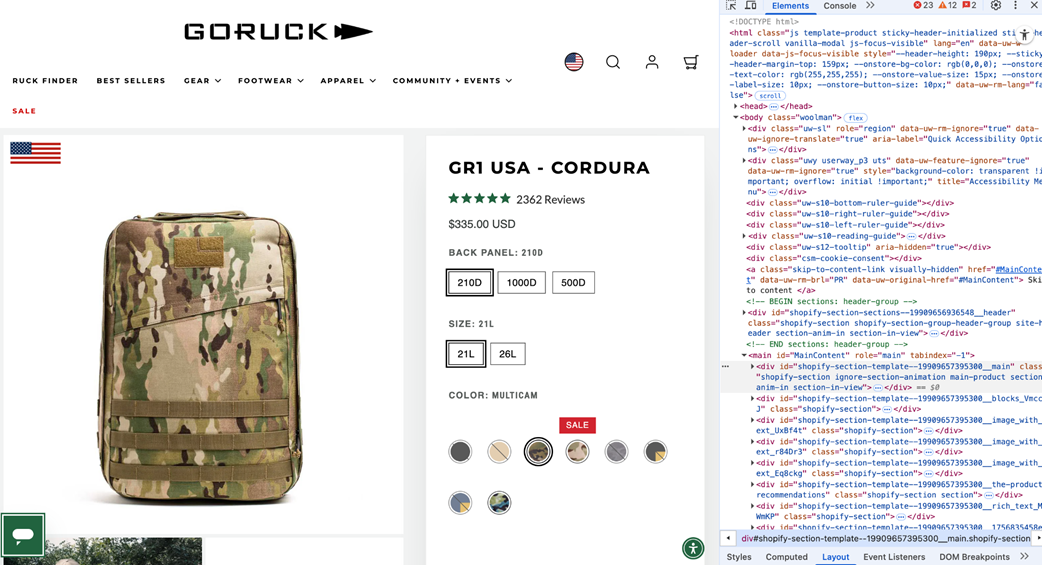
Compare the rendered product page with its nested markup to see why a visually obvious price or variant still requires deliberate extraction logic. section 10.4.3
Listing 10.4 Finding the title and price in the GORUCK HTML
from bs4 import BeautifulSoup

soup = BeautifulSoup(html_content, "html.parser")

# Try to find the product title
title_el = soup.find("h1")  #A
title = title_el.get_text(strip=True) if title_el else None

# Find the price block used on this product page
price_block = soup.select_one("div.product-block__price")  #B

price = None
if price_block:
    # Prefer sale price if present, otherwise fall back to regular price
    price_el = (  #C
        price_block.select_one("span.price-item--sale")
        or price_block.select_one("span.price-item--regular")
    )
    if price_el:
        price = price_el.get_text(" ", strip=True)

print(f"Title: {title}")
print(f"Price: {price}")
Use the listing as a concrete pattern for parsing page source, selecting a price container, handling sale-versus-regular prices, and tolerating missing elements. section 10.6