HTTP POST sends submitted data to a server. A common web flow starts with GET: the browser fetches a page containing a form. Submitting that form sends a POST request, letting the server validate the input and either redisplay the form with errors or continue to a new page. section 7.1.1
Figure 7.2 Logic flow for a view that handles form submission
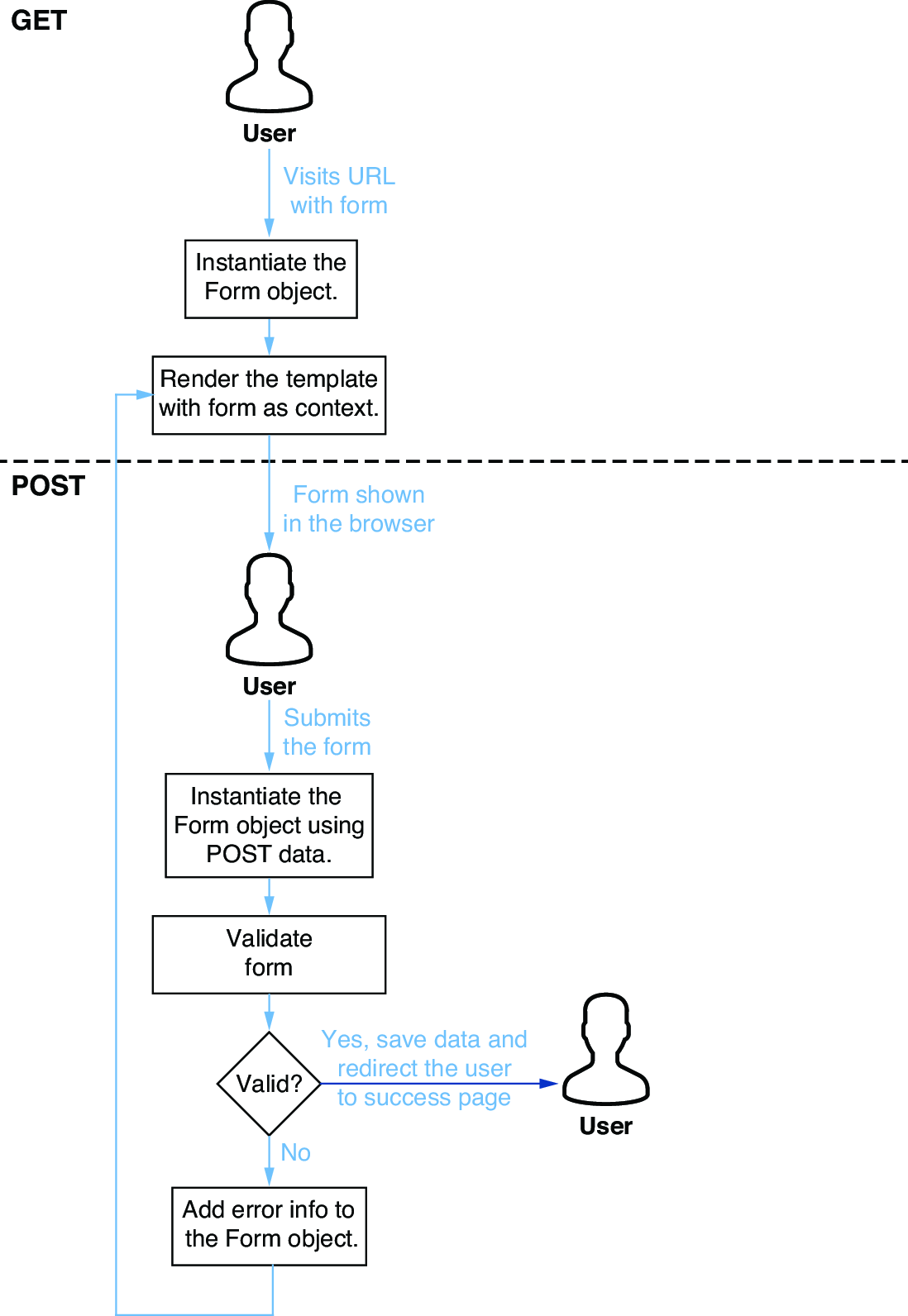
Follow the usual single-view pattern: GET creates an empty form; POST binds submitted data, validates it, and either rerenders errors or redirects after success. section 7.1.1
In a Django view, inspect request.method to choose the path. For POST, pass request.POST to the form, call is_valid(), and read cleaned_data only after validation succeeds. A successful handler can perform work—such as sending email—then redirect to a confirmation page. Invalid data falls through to render the form again, now carrying error information. section 7.1.1 section 7.6
Comment submission
A comment page uses <form method="post"> and {% csrf_token %}. Its view creates CommentForm() on GET; on POST it creates CommentForm(request.POST), validates the fields, emails the comment, and redirects to a “Comment Accepted” page. The token is not decorative confetti: it helps prevent cross-site request forgery. section 7.1.1 section 7.6
POST also creates data through APIs. A Django Ninja endpoint decorated with .post() accepts a JSON payload defined by an input schema, converts it to a dictionary, and creates a Venue object. API input and output representations may differ; for example, newly created input has no ID while returned output does. section 11.2.6
REST conventions commonly treat GET as read and POST as creation or modification. For a more specific update contract, PUT supplies all fields, PATCH supplies changed fields, and DELETE removes data. REST is loosely defined, so these conventions guide design rather than enforce it. section 11.1.1 section 11.5













