Hue is the part of a color that answers the everyday question, “What color is it?” Red, blue, purple, cyan, and green are hues. More precisely, hue identifies a color’s position on the visible spectrum or color wheel—its pure pigment—not how light, dark, muted, or vivid that color appears. section 4.2
Hue is only one coordinate of a color. Value, lightness, or brightness describes dark-to-light variation; saturation describes the distance from gray to a pure, vivid color. A green can therefore remain green while becoming pale, dark, or grayish. Treating hue as the whole story is an easy way to make color choices that look right in your head and wrong on the screen. section 4.2
Figure 4.15 The HSB color wheel (constant 100% saturation and brightness), with the hue values labeled
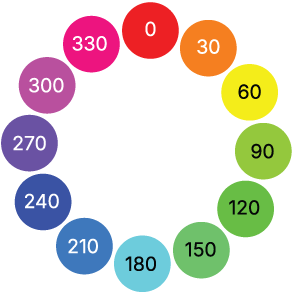
On the HSB/HSV wheel, hue is an angle from 0 to 360 degrees. Red sits at both 0° and 360° because the circle wraps around; each position between them identifies another hue. section 4.2.2
Nudging a green
In HSB, green at hue 120 corresponds to RGB(0,255,0), or #00FF00. Raise its hue toward 150 and it moves toward blue, producing a cooler, mellower green. Lower it toward 90 and it moves toward yellow, producing a warmer green. Because hue is circular, these changes are predictable directional moves rather than mysterious color-picker luck. section 4.2.2
Hue appears in both HSB/HSV and HSL. The hue and saturation parts work similarly; the practical distinction is the final coordinate. HSB uses brightness, while HSL uses lightness. In HSL, 0% lightness is black and 100% is white for any hue, with a fully saturated true color at 50% lightness. section 4.2.2 section 4.2.3
When using hue for continuous data color scales:
- Start a straightforward sequential scale with one hue, then vary saturation and lightness to communicate increasing value. section 4.3.1
- Do not vary saturation alone: changing lightness too makes the scale more legible in grayscale and more usable for people with impaired color vision. section 4.3.1
- Use two hues when a single-hue gradient leaves low values too close to the background; still vary lightness or brightness so values remain distinguishable. section 4.3.1
Hue can make a scale feel ordered, warm, cool, or visually emphatic, but it should not carry the full burden of meaning. For ordered values, lighter and darker steps help viewers read magnitude even when hue differences are hard to see. In short: pick hues deliberately, then give them enough lightness contrast to do useful work. section 4.3.1





