Hue is the part of a color that answers “which color is it?” Think of the color wheel as a circular spectrum: hue marks a position on that wheel. In HSL color notation, it is measured in degrees from 0 through 359. Red starts at 0, then the wheel moves through yellow, green, blue, and violet before returning to red. No wizard robe required—just a number that points to a color. section 17.1
Figure 17.2 Hue refers to the position on the color wheel, starting at 0 (red) and passing through 120 (green) and 240 (blue).
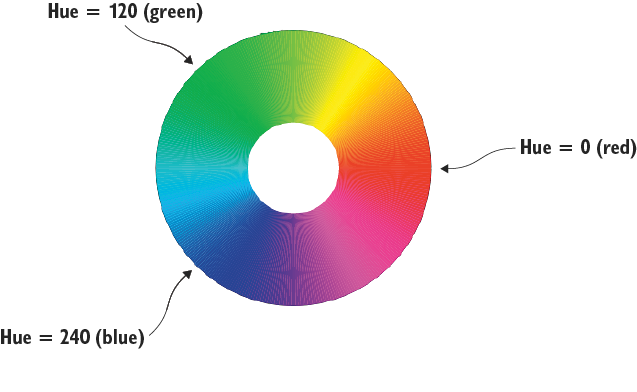
Use the wheel as a quick map: 0 is red, 120 is green, and 240 is blue. Values between those landmarks select the colors in between. section 17.1
Hue is one of the three ingredients in HSL: hue, saturation, and lightness. Hue chooses the basic color; saturation controls how pure or gray it appears; lightness controls how dark or light it is. Keeping hue fixed while changing saturation or lightness creates different versions of the same basic color. section 17.1
Set a heading to purple
CSS uses hsl() to write hue, saturation, and lightness together. This rule gives an h1 a purple hue at 300 degrees, full saturation, and relatively low lightness: h1 { color: hsl(300, 100%, 25%); } The first value is the hue. The next two values are percentages, so keep those percent signs attached. section 17.4
Hue is especially handy when choosing colors that belong together:
- Use complementary colors for contrast: their hue values are 180 degrees apart. Red at hsl(0, 100%, 50%) pairs with hsl(180, 100%, 50%). Make one the main color and reserve the other for accents such as call-to-action buttons. section 17.6
- Use analogous colors for a nearby-family look: choose hues about 30 degrees above and below a main hue. section 17.6
- Avoid tossing a dozen hues onto one page. Two or three colors, or shades of two or three hues, can reduce confusion and eye fatigue. section 17.6
If the degree arithmetic starts acting like a tiny gremlin, use a color-scheme calculator. Enter a starting color as an HSL value, RGB value, hex triplet, or keyword; select complementary, analogous, triadic, split-complementary, or monochrome; then inspect the generated CSS color values. A monochrome scheme keeps one hue while varying saturation and lightness. section 17.7 section 17.5





