Hue identifies a color family—red, green, blue, and every transition between them. In hue-based color spaces, it is an angle around a color wheel: 0° is red, 120° green, and 240° blue. Because the wheel wraps, 360° is effectively red again. This makes hue useful when a UI needs a color relationship rather than a fixed RGB triplet. section 7.1.2 section 7.3
Figure 7.2 You can visualize the HSL color model as a cylinder.
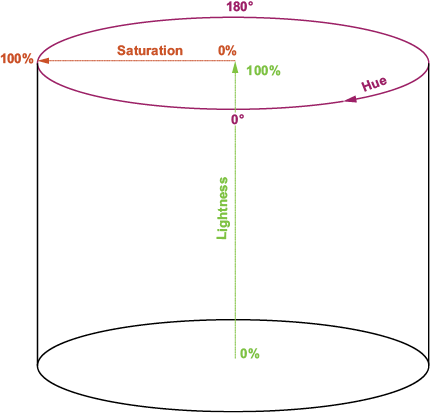
Visualize HSL as a cylinder: hue travels around its edge, while saturation moves outward from gray and lightness moves from black to white. section 7.1.2
In CSS HSL, place hue first: `hsl(300 100% 25%)` selects a purple-family hue, then sets its saturation and lightness. Changing only the hue rotates through color families; changing lightness instead makes the same hue darker or lighter. Hue has no visible chromatic meaning when saturation is 0%, because the result is gray. section 7.1.2 section 7.2.2
Build a color scheme by shifting hue
Start with a base hue `H`. Its complementary hue is `(H + 180) % 360`; analogous hues are commonly `H ± 30`; triadic hues are `H ± 120`. CSS custom properties and `calc()` let one base hue drive a related palette without manually choosing each color. section 7.3.1 section 7.3.2 section 7.3.3
OKLCH also uses hue as a 0–359° angle, but its hue is derived from CIELAB perception. Rotating hue in HSL can alter apparent brightness; rotating hue in OKLCH is intended to retain perceived brightness. Keep lightness and chroma fixed to make more uniform hue adjustments, while checking wide-gamut OKLCH colors on regular monitors when not targeting Display P3. section 7.1.4
Turn scroll progress into a hue
Map a normalized scroll value from 0 to 1 onto a hue range. `const hue = scrollProgress * 120` changes a reading indicator from red at the top toward green at the bottom, while the same progress value controls its width. section 13.3.1
Listing 13.6 Implementing a reading progress indicator
HTML:
<div id="progress-bar"></div>  #1
<main>
    <article>
        <!-- Article text appears here -->
    </article>
</main>

CSS:
#progress-bar {
    position: fixed;  #2
    top: 0;   #2
    left: 0;   #2
    height: 1rem;
    background: red;
    width: 0;
    font-size: 0.85rem;
    font-weight: bold;
    text-align: center;
    z-index: 1000;
    transition: width 0.2s cubic-bezier(.25, .8, .25, 1);
}
Use the progress-indicator structure and styling as the visual target for a scroll-driven hue change. section 13.3.1





