A hypervisor, also called a virtual machine monitor (VMM), enables multiple operating systems to share one physical server. It manages and allocates CPU, RAM, storage, and other hardware resources to virtual machines (VMs), improving utilization when individual servers would otherwise be underused. section 17.1.1
Classify hypervisors by where they run:
- Type 1, or bare-metal/native hypervisors, run directly on physical hardware. VMware ESXi and Microsoft Hyper-V are examples; data centers and cloud environments commonly use this type because it uses hardware efficiently. section 17.1.1 section 17.4
- Type 2 hypervisors run as applications on a host operating system. They use hardware less efficiently than type 1 hypervisors but are easier to set up and are common for development, testing, and education. section 17.4
The operating system running directly on hardware is the host OS; an operating system inside a VM is a guest OS. Each VM behaves as an independent network host with a virtual NIC (vNIC). A virtual switch forwards frames between VM vNICs and the host’s physical NICs, with access or trunk ports supporting VLAN segmentation. section 17.4
Figure 17.6 VMs connect to each other and the external physical network via a virtual switch. VMs are often segmented into separate VLANs, requiring trunk links.
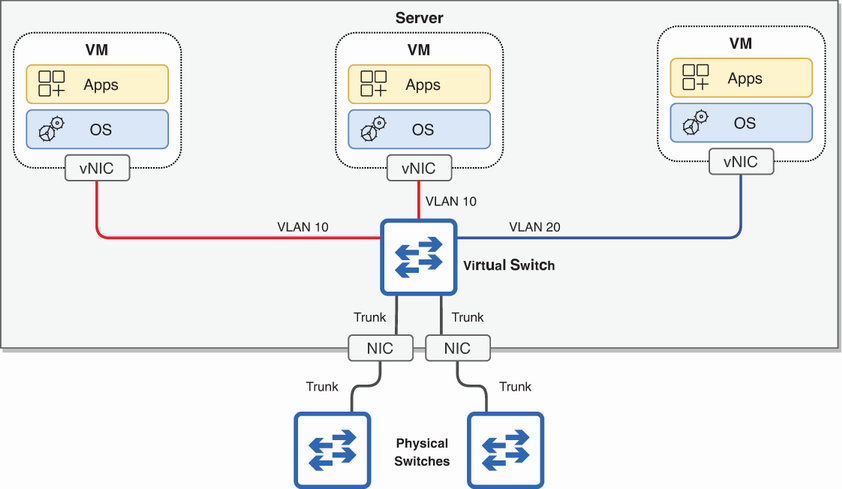
Trace how virtual switches connect VM vNICs to one another and to the external physical network, including VLAN trunking. section 17.1.1


