Interpolation creates intermediate images by mixing inputs before generation, rather than blending finished pictures. In diffusion models, the input can be an initial noise tensor; in text-to-image generation, it can be a text embedding. Changing the mixture lets you inspect how each input influences the result. section 7.1.3 section 10.5
For two noise tensors z₁ and z₂, a simple blend is αz₁ + (1 − α)z₂, with α between 0 and 1. At the endpoints, the blend equals one original tensor; intermediate weights combine both. Feed each blended tensor through the same trained denoising U-Net to produce a sequence of images. section 7.1.3
Figure 7.3 How image interpolation works in diffusion models. Initial noise tensor A (top left) leads to final output A (top right), while initial noise tensor B (bottom left) leads to final output B (bottom right). We create an interpolated noise tensor (middle left) by averaging initial noise tensors A and B. We then feed this interpolated noise tensor into the trained denoising U-Net model to obtain an interpolated output image (middle right), which shows the characteristics of both final images A and B.
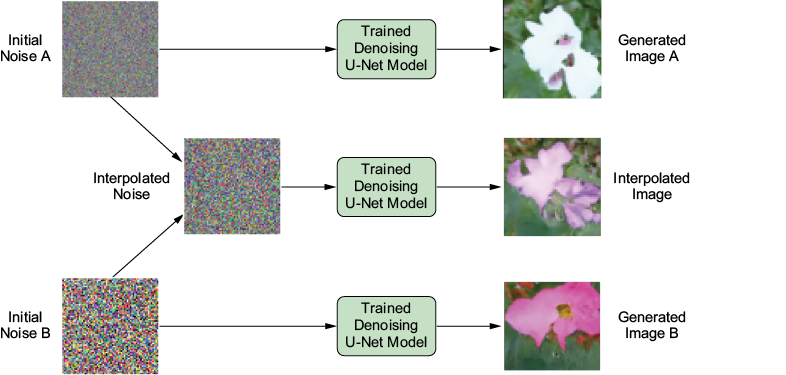
The diagram traces two flower-generating noise tensors through the denoising model and shows how an equal-weight blend produces an intermediate flower image. section 7.1.3
For a reproducible flower sequence, fix the random state, select two tensors by index, vary their weights, and denoise the resulting batch with a DDIM scheduler. The implemented interpolate() method makes ten blends using sine and cosine weights, then runs 50 inference steps. Its sampled weights approach the endpoints rather than using the exact endpoint tensors. section 7.4.2
Listing 7.7 Defining the interpolate() method
@torch.no_grad()
def interpolate(self,model,a_idx,b_idx,batch_size=1,generator=None,
    eta=1.0,use_clipped_model_output=True,num_inference_steps=50,
             device=None):
    if device is None:
        device = "cuda" if torch.cuda.is_available() else "cpu"
    image0 = torch.randn((batch_size, model.in_channels,
      model.sample_size, model.sample_size),generator=generator,
                         ).to(device)
    image = torch.zeros((batch_size, model.in_channels,
      model.sample_size, model.sample_size)).to(device)
    a,b=image0[a_idx],image0[b_idx]    #1
    for i in range(10):    #2
        ab=torch.sin(torch.tensor(0.5*math.pi*(0.05+i/10)))*a+\
            torch.cos(torch.tensor(0.5*math.pi*(0.05+i/10)))*b
        image[i]=ab
    self.set_timesteps(num_inference_steps)
    for t in tqdm(self.timesteps):    #3
        model_output = model(image, t)["sample"]
        image = self.step(model_output,t,image,eta,
          use_clipped_model_output=use_clipped_model_output,
                          generator=generator)
    image = unnormalize_to_zero_to_one(image)
    image = image.cpu().permute(0, 2, 3, 1).numpy()
    return image
The method shows where the two noise tensors are selected, how ten weighted tensors are assembled, and where denoising begins. section 7.4.2
A reproducible flower transition
Set the random seed to 100 and select noise indices 1 and 7. Generate ten images with 50 inference steps and eta=0, then display them side by side. To try another transition while keeping the comparison reproducible, change the selected indices and retain the seed. section 7.4.2
The same weighting idea works on text conditioning. Combine embeddings for “a lion” and “a tiger” with complementary weights of 0.9/0.1 through 0.1/0.9. Each combined embedding guides latent image generation; a VAE decoder turns the latent result into a high-resolution image. Across the five outputs, tiger characteristics become more prominent as the tiger weight increases. This changes the guidance supplied to generation, not the initial noise tensor. section 10.5
images=[]
for weight in [0.9, 0.7, 0.5, 0.3, 0.1]:    #1
    text_embeddings = weight * text_embeddings1 +\
        (1-weight) * text_embeddings2    #2
    latents=gen_latents(text_embeddings,seed=5)    #3
    with torch.no_grad():
        images.append(vae.decode(latents).sample)    #4
The loop gives the five embedding weights and shows the handoff from each weighted embedding to latent generation and VAE decoding. section 10.5








