A join combines rows from separate tables by matching related fields. Before joining, check whether those fields use compatible values or need a linking key. section 9.3.1
Weekly productivity reporting
One table connects team names to product areas. Another connects team names to assigned people and weekly completed work. Joining them enables a report of weekly work by product area. If one system stores TEAM ALPHA as uppercase text without spaces while the other uses a different structure, simple cleaning may not be enough; a mapping table must link the names. section 9.3.1
Check these conditions before relying on a join:
- Inspect how each system stores the proposed matching field. section 9.3.1
- Use light data cleaning when differences are only formatting. section 9.3.1
- Create a mapping key when the values are structured differently and cannot be fixed programmatically. section 9.3.1
Figure 9.9 System A stores team names in the format on the left, uppercase with no spaces, while system B on the right doesn’t follow any particular format. If you try to join these tables on System A’s team name equals system B’s team name, you might, at best, get a few results, but certainly not all of them. You’ll need to find some way to link them.
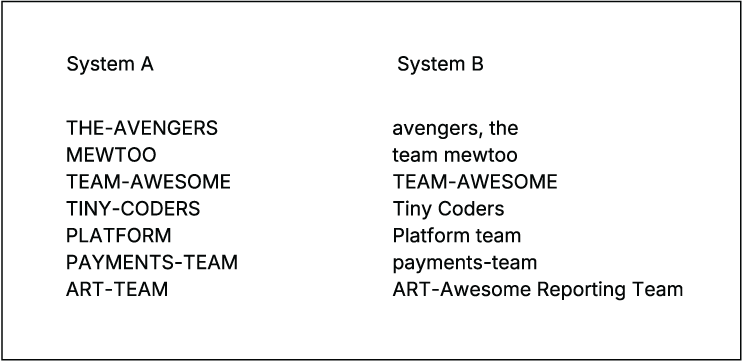
Compare the two team-name formats to see why an apparent match can return incomplete results. section 9.3.1















