A link-state database (LSDB) is an in-memory map of network topology. Link-state routing protocols use it to calculate the best route to each destination. section 17.2.1 section 18.1.1
In OSPF, each router creates link-state advertisements (LSAs) describing its connected networks and sends them to neighbors. LSA flooding distributes these advertisements throughout the OSPF area, where routers organize them into LSDBs. section 18.1.1
Routers in the same OSPF area should have identical LSDBs. Each router then runs the Shortest Path First (SPF) algorithm against that shared topology map, unlike distance-vector protocols that do not maintain a complete network map. section 18.1.1 section 18.5
An LSDB contains information represented by different OSPF LSA types:
- Type 1, Router LSA: describes links advertised by each router. section 18.4
- Type 2, Network LSA: lists routers on a broadcast segment and is generated by its designated router. section 18.4
- Type 5, AS External LSA: advertises routes to networks outside the OSPF autonomous system. section 18.4
OSPF neighbors exchange database description messages that summarize their LSDB contents, request missing LSAs, send updates, and acknowledge receipt. The Full state indicates that neighboring routers have synchronized their LSDBs. section 18.3.1
Large LSDBs consume more memory, and SPF calculations consume more CPU and time. Multi-area OSPF limits each area to a smaller LSDB, reduces recalculation costs, and confines many topology changes to the local area. section 17.2.1 section 18.1.2
Verifying an OSPF LSDB
Use `show ip ospf database` to inspect the LSDB. The output should contain the same LSAs on every router in the area; the example shows Router, Network, and Type-5 External Link States. section 18.4
Figure 18.1 Routers flood LSAs within the OSPF area to ensure all routers have an identical LSDB. The LSAs that make up the LSDB contain information about each router’s connected networks, such as their cost. R1’s LSA indicates that it is connected to 10.0.0.0/30, 10.0.0.4/30, and 10.1.1.0/24, each with a cost of 1.
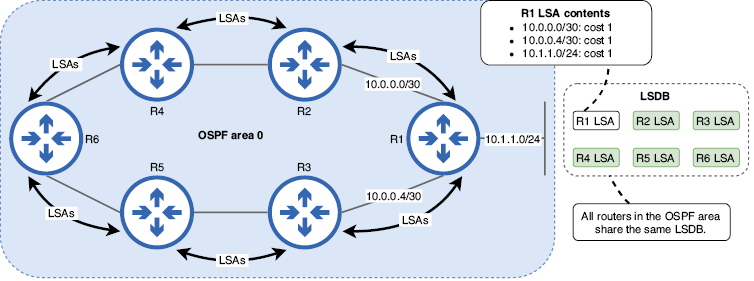
Diagram showing how routers flood LSAs within an OSPF area to build identical LSDBs, including connected networks and their costs. section 18.1.1
