Load balancing keeps Kafka brokers from carrying substantially different workloads. The target is not merely a similar partition or leader count: CPU, memory, and network consumption should also remain comparable. section 14.1.4
In Kafka, balancing is achieved by moving partitions between brokers. Manual planning becomes impractical as clusters grow, so Cruise Control measures broker load, analyzes it against configured goals, proposes changes, and executes approved proposals. section 14.1.4
A practical balancing workflow is:
- Monitor brokers through Cruise Control’s metrics component, which records measured load in a Kafka topic. section 14.1.4
- Run the analyzer when monitoring shows uneven distribution, then review its proposed partition movements. section 14.1.4
- Execute an accepted proposal through the Cruise Control REST API or UI; automatic error detection can analyze and execute changes when goals are not met. section 14.1.4 section 14.4
Rebalancing an uneven cluster
Suppose monitoring shows that one broker consumes substantially more CPU, memory, or network capacity than its peers. Cruise Control can propose moving partitions from that broker to others. Review the proposal before execution, and avoid moving partitions while Kafka is already operating near its limits because the operation can create very high load. section 14.1.4
Figure 14.2 Cruise Control for Apache Kafka monitors and optimizes the load of a Kafka cluster.
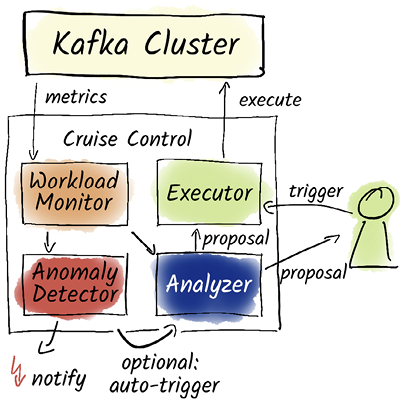
The diagram shows how Cruise Control monitors broker load and optimizes a Kafka cluster through analysis and partition movement. section 14.1.4