Load balancing places an infrastructure component between users and an application. It distributes incoming requests across multiple service instances, helping the application remain scalable and reliable when traffic increases or an instance fails. section 12.4.3
A typical request follows this path:
- The browser sends a request to the load balancer. section 12.3.3
- The load balancer forwards the request to one of the EC2 instances running the application. section 12.3.3
- Each instance passes the request to its Docker container, where the application processes it and generates a response. section 12.3.3
- The load balancer returns the response to the browser and can redirect traffic away from failed or overloaded instances. section 12.4.3
Creating a load-balanced Elastic Beanstalk environment
Running `eb create` provisions an environment with multiple EC2 instances, a load balancer, networking rules, and monitoring. The default application load balancer distributes traffic between instances. A single-instance deployment can avoid load-balancer costs, but it removes this multi-instance arrangement. section 12.3.6
A load balancer can also terminate HTTPS connections. Configure an HTTPS listener on port 443, attach the certificate, and forward traffic to the application instead of making the application handle encryption directly. section 12.4.3
Figure 12.4 The end state of the deployed Streamlit app on AWS
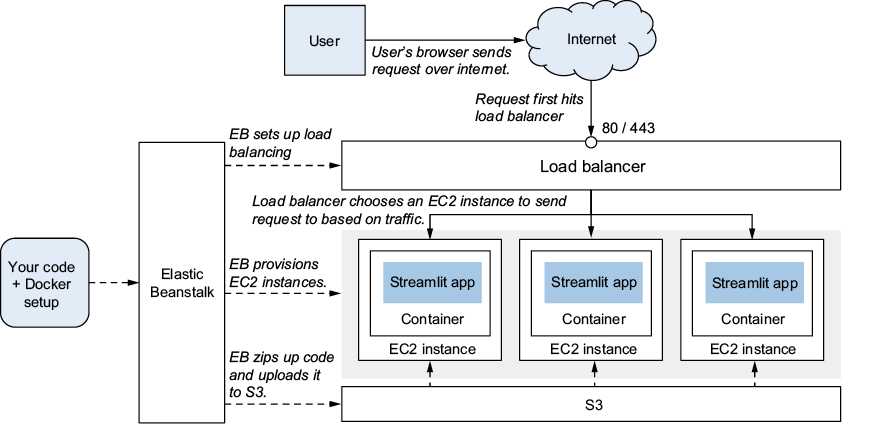
Use the deployment architecture diagram to trace traffic from the browser through the load balancer, EC2 instances, Docker containers, and application. section 12.3.3
Figure 12.12 Adding an HTTPS listener and a certificate to the load balancer
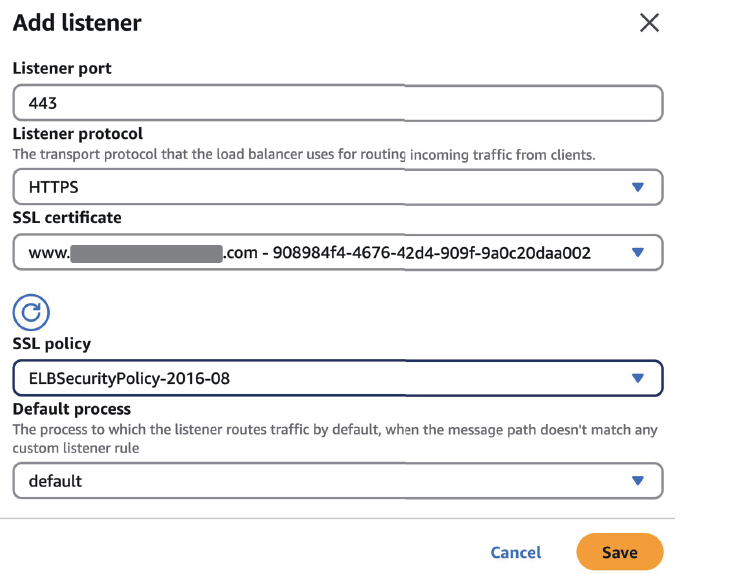
Use the configuration figure to inspect the HTTPS listener and certificate settings on the load balancer. section 12.4.3