A Log Analytics workspace (LAW) is an Azure Monitor destination for collected telemetry and security data. Agents send VM data to a workspace, where Defender for Cloud can use it to identify VM weaknesses and misconfigurations. Workspace choice affects management, data separation, retention, and potentially cost. section 6.2.1 section 9.1.4
Defender for Cloud can create a default workspace during subscription onboarding, generally one per applicable region. A default workspace is convenient, but a custom centralized workspace can better fit organizational management requirements. For OS collection, Azure Monitor Agent (AMA) succeeds the Log Analytics agent and can route performance and security events to different workspaces through data collection rules. section 6.2.1 section 9.1.4
Use a workspace as a security-data destination in several ways:
- Export Defender for Cloud recommendations, secure score data, security alerts, and regulatory compliance data while keeping that data in Azure. section 7.5.1
- Enable Microsoft Sentinel on a selected workspace to begin collecting data for security operations. section 8.2.2
- Separate performance data from security events when Sentinel ingestion charges make a single destination less useful for security monitoring. section 9.1.4
Retain higher-severity Defender for Cloud data
Configure continuous export for a subscription to send medium- and high-severity security alerts and recommendations to a selected workspace. Enable both streaming updates and weekly snapshots. Changed alerts are stored in the SecurityAlert table; recommendations are stored in SecurityRecommendation, where they can be analyzed. The configuration requires Security Admin or Owner access on the resource group, plus workspace permissions appropriate to its solution state. section 7.5.2 section 7.5.1
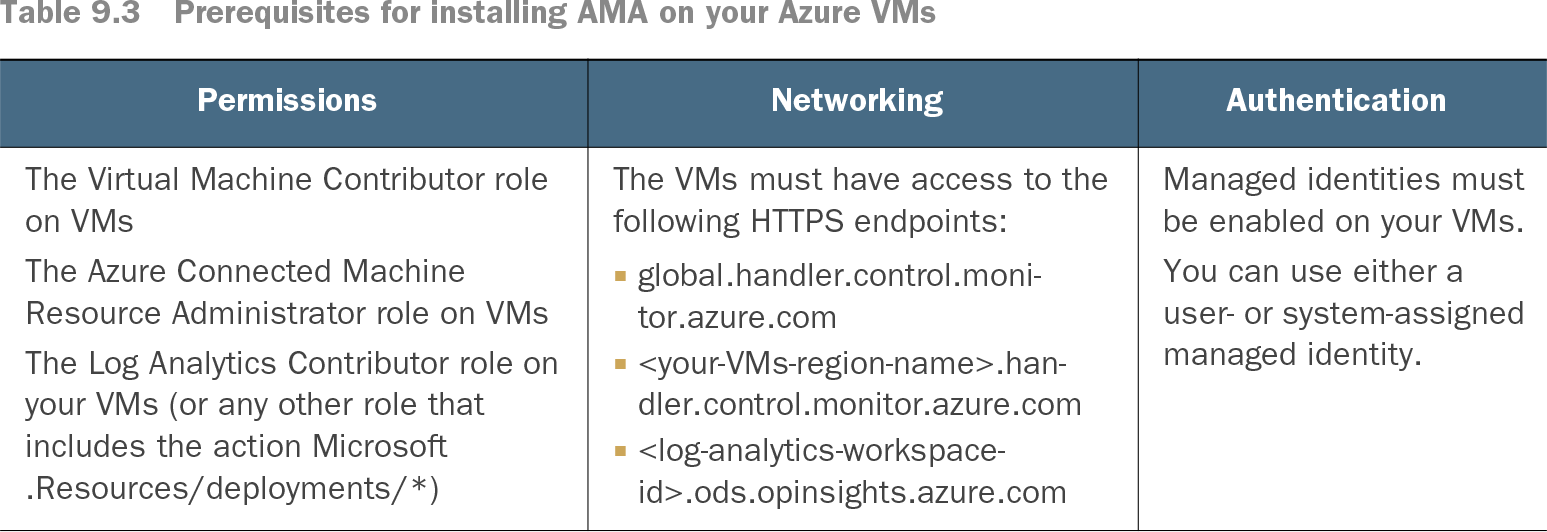
Table 9.3 Prerequisites for installing AMA on your Azure VMs (view table figure)
Before installing AMA on Azure VMs that will send data to a workspace, verify required VM roles, HTTPS access to the workspace endpoint, and a managed identity. section 9.1.4