liveBook · Manning

Log Analytics

As explained in Practical Automation with PowerShell: Effective scripting from the console to the cloud

Log Analytics is an Azure monitoring and data collection service that stores, searches, and analyzes diagnostic and metric data.

Log Analytics is an Azure monitoring and data collection service that stores diagnostic and metric logs from Azure services, virtual machines, and on-premises servers. Kusto queries search the collected data, while query results can drive alerts. section 8.2.2

In Azure Automation, a workspace provides operational visibility into job executions, outputs, and errors. Adding the Automation solution also enables the workspace to support hybrid runbook workers. section 8.2.2 section 8.6

Connect Log Analytics to Azure Automation through this implementation sequence:

  • Create an Azure Automation account and a Log Analytics workspace in a resource group. section 8.2.2 section 8.2.3
  • Place linked resources in compatible regions; matching regions are generally required, with documented exceptions. section 8.2.3
  • Add the Azure Automation solution to the workspace by using its workspace resource ID. section 8.2.3
  • For hybrid execution, install the Microsoft Monitoring Agent, connect it to the workspace, and use the downloaded hybrid runbook worker components. section 8.2.2
  • Forward automation logs to the workspace and create alerts for failed jobs or errors. section 8.2.2

Provisioning the workspace

Install the Az and Az.MonitoringSolutions modules, connect to the target subscription, create the workspace, then add the AzureAutomation solution with New-AzMonitorLogAnalyticsSolution. Use names that satisfy Azure resource rules and choose compatible locations before linking resources. section 8.2.3

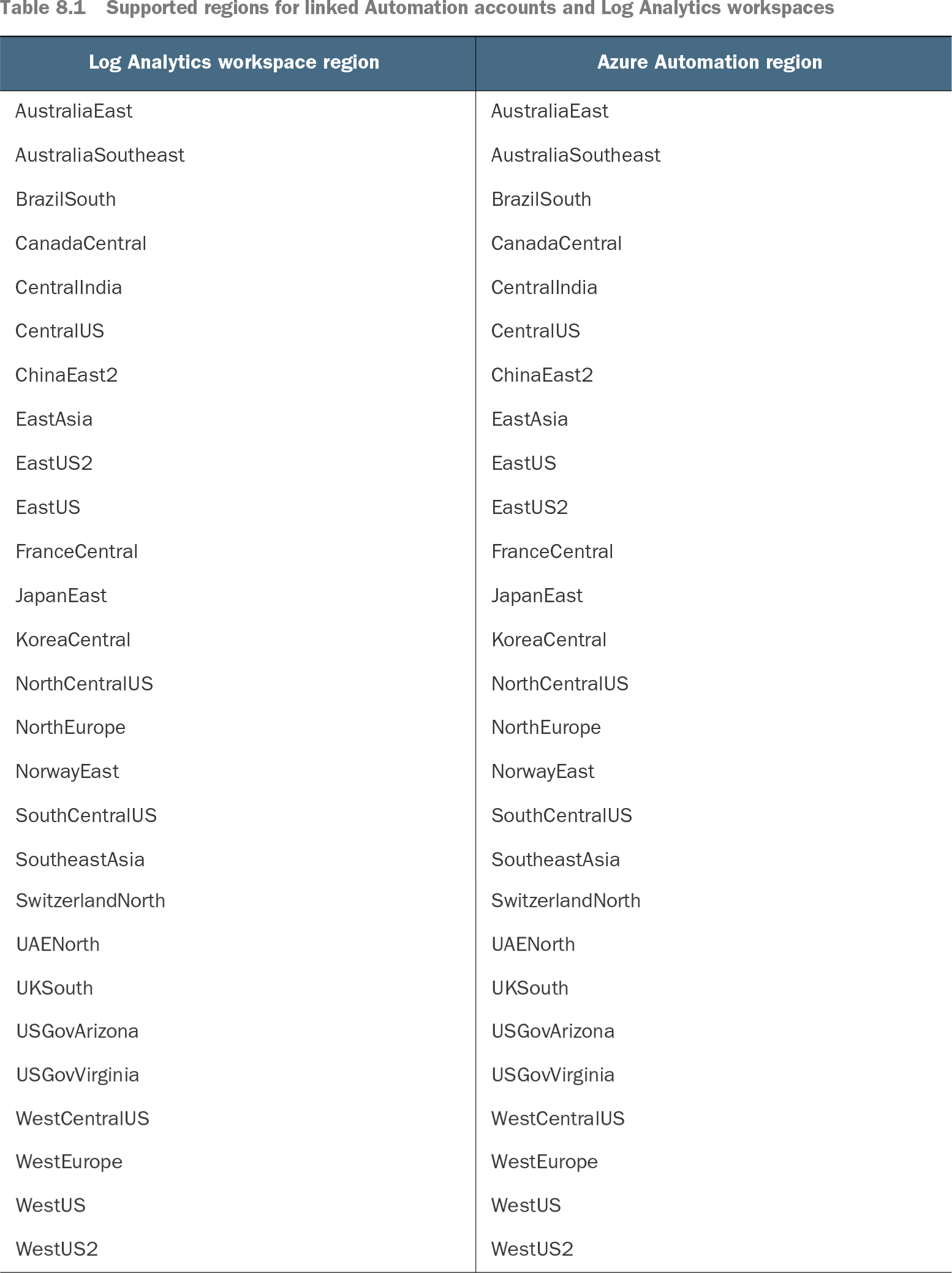
Table 8.1 Supported regions for linked Automation accounts and Log Analytics workspaces (view table figure)

Log Analytics workspace region

Azure Automation region

AustraliaEast

AustraliaEast

AustraliaSoutheast

AustraliaSoutheast

BrazilSouth

BrazilSouth

CanadaCentral

CanadaCentral

CentralIndia

CentralIndia

CentralUS

CentralUS

ChinaEast2

ChinaEast2

EastAsia

EastAsia

EastUS2

EastUS

EastUS

EastUS2

FranceCentral

FranceCentral

JapanEast

JapanEast

KoreaCentral

KoreaCentral

NorthCentralUS

NorthCentralUS

NorthEurope

NorthEurope

NorwayEast

NorwayEast

SouthCentralUS

SouthCentralUS

SoutheastAsia

SoutheastAsia

SwitzerlandNorth

SwitzerlandNorth

UAENorth

UAENorth

UKSouth

UKSouth

USGovArizona

USGovArizona

USGovVirginia

USGovVirginia

WestCentralUS

WestCentralUS

WestEurope

WestEurope

WestUS

WestUS

WestUS2

WestUS2

Use the supported-region table to validate the regional pairing between an Automation account and its Log Analytics workspace. section 8.2.3


How Practical Automation with PowerShell: Effective scripting from the console to the cloud covers it

How deep it goes
Explains workspace setup, Automation integration, Kusto queries, alerts, and hybrid-worker prerequisites without detailing query syntax or agent internals.
Examples
Demonstrates PowerShell provisioning, Automation-solution installation, regional pairing, and logging runbook executions, outputs, errors, and failed jobs.
What it assumes
Assumes Azure subscription access and PowerShell familiarity; teaches the required Azure modules, resources, solution, agent, and regional linkage.
What you can do after
Operate/configure a workspace for Azure Automation logging, alerting, and hybrid runbook worker support.
How it connects
Connects Azure Automation, hybrid runbook workers, Microsoft Monitoring Agent, Kusto Query Language, diagnostic logs, metrics, and Azure resources.

Also explained in

Compare how 3 books explain Log Analytics →

Related concepts

This explainer was generated by Manning's knowledge graph from the text of Practical Automation with PowerShell: Effective scripting from the console to the cloud. The section links point to the parts of the book it draws on.