A managed device is a network device that exposes operational or configuration information to a network management system through SNMP. Routers and switches are common examples; servers, PCs, laptops, and printers can also be managed. section 6.0
A managed device participates in SNMP through these functions and components:
- Stores device information as variables in a Management Information Base (MIB), including interface status, CPU utilization, temperature, and routing-neighbor state. section 6.1
- Runs an SNMP entity consisting of an SNMP agent and the MIB; the agent listens for manager messages on UDP port 161. section 6.1.2
- Answers Get queries with Response messages, allowing an NMS to read one or more MIB variables and automate periodic monitoring. section 6.1.1
- Accepts Set messages that modify MIB variables, including centralized configuration changes, reboots, and configuration-file backups. section 6.1.1 section 6.4
- Sends Trap messages to notify the NMS about events such as an interface going down; the NMS manager listens on UDP port 162. section 6.1.2 section 6.4
Interface monitoring and notification
An NMS sends a Get message to learn whether R1’s GigabitEthernet0/1 is up or down. If the interface later goes down, R1 sends a Trap to the NMS, which can notify an administrator by email or SMS. section 6.1.1
Figure 6.4 The components of the NMS’s and managed devices’ SNMP entities. The NMS’s SNMP entity consists of the SNMP manager and SNMP application(s). The managed devices’ SNMP entities consist of the SNMP agent and the MIB.
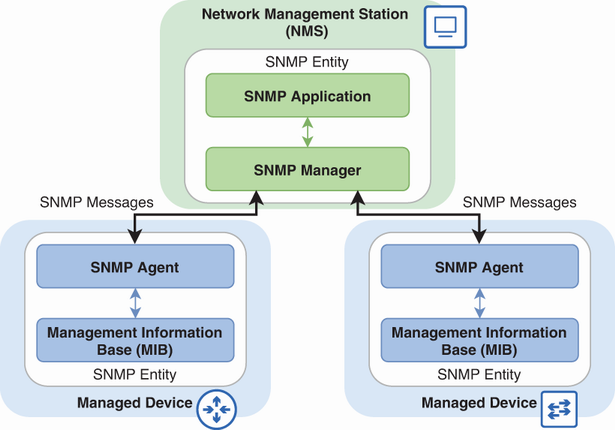
Use the component diagram to distinguish the NMS’s manager and applications from a managed device’s agent and MIB. section 6.1.2

