liveBook · Manning

Module

As explained in Learn PowerShell in a Month of Lunches: Fourth Edition, Covers Windows, Linux, and macOS

A module is a packaged unit of reusable code and related resources that can be loaded into a software environment.

A module is a packaged extension that adds reusable commands to PowerShell. Like a phone app adds capabilities, a module adds commands for tasks such as managing Azure resources. section 7.0 section 7.1

Use modules as a practical workflow:

  • Find a module in the PowerShell Gallery or another registered repository. section 7.2
  • Review compatibility, installation requirements, publisher, and code before trusting it. section 7.2 section 9.2
  • Install the module, verify that it is available, and inspect the commands it provides. section 7.2 section 9.2
  • Read command help, especially examples and full descriptions, before using unfamiliar commands. section 7.6

Install and inspect a module

Install-Module -Name Az prompts for repository trust. After installation, Get-Module Az -ListAvailable verifies availability. For a YAML task, Find-Module *YAML* locates candidates, Install-Module powershell-yaml adds one, and Get-Command -Module powershell-yaml reveals ConvertFrom-Yaml and ConvertTo-Yaml. section 7.2 section 9.2
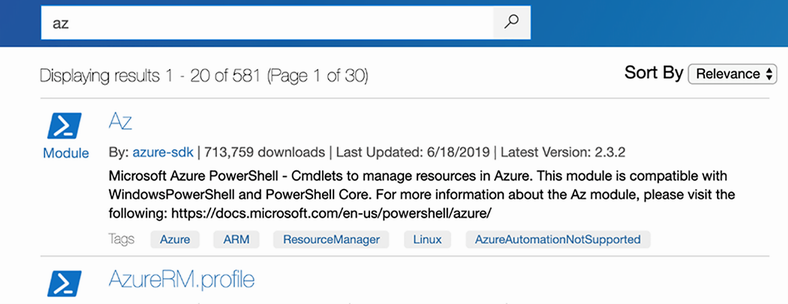
Figure 7.1 Showing the search for Az in the PowerShell Gallery

Browse the PowerShell Gallery search for the Az module to connect module discovery with installation planning. section 7.2


How Learn PowerShell in a Month of Lunches: Fourth Edition, Covers Windows, Linux, and macOS covers it

How deep it goes
Defines modules, distinguishes them from snap-ins, and demonstrates discovery, installation, verification, and command lookup without covering implementation internals.
Examples
Uses the Az module, PowerShell Gallery searches, YAML conversion commands, and module inventory exercises.
What it assumes
Assumes basic PowerShell command use while teaching module discovery and installation through practical administration tasks.
What you can do after
Operate/configure modules by finding, reviewing, installing, verifying, and querying their commands.
How it connects
Connects modules to PowerShell commands, package managers, repositories, help, and remoting.

Also explained in

Compare how 35 books explain module →

Related concepts

This explainer was generated by Manning's knowledge graph from the text of Learn PowerShell in a Month of Lunches: Fourth Edition, Covers Windows, Linux, and macOS. The section links point to the parts of the book it draws on.
































