A module organizes code behind an explicit boundary: it exposes what other files need and keeps the rest out of their way. Splitting an application into modules reduces the amount of code you must reason about at once and lets different parts evolve separately. Functions and objects can provide similar boundaries within a file; a module system manages dependencies and exposure across files. section 6.0 section 6.2.4
JavaScript offers two broad ways to manage those boundaries:
- Dynamic systems define dependencies and exposed values through running code. CommonJS uses require(...); object namespaces, IIFEs, and factory functions can also assemble modules programmatically. This permits conditional loading, but leaves more of the boundary management to application code. section 6.3 section 6.2.4
- ECMAScript Modules (ESM) use native import and export syntax to declare contracts statically. Top-level imports give runtimes and tools a dependency map ahead of execution; use import(...) when loading must be conditional. section 6.3 section 6.4.3
Importing an ESM API
import { checkIndex, checkLinkage } from './block/validations.js'; The braces select named exports; they do not destructure a copied object. Imports remain connected to their exports as live bindings. Use import { foo as newFoo } to rename a binding, or import * as ValidationsUtil to collect exports under one namespace. section 6.4.3 section 6.3
Write ESM specifiers with the target environment in mind. Relative paths start with ./ or ../ and explicitly include a file extension; bare package specifiers are an exception. ESM files enter strict mode automatically. In Node.js, a package.json type of "module" or an .mjs extension identifies ESM, while .cjs identifies CommonJS. section 6.4.1 section 6.4 section 6.4.4
Static contracts also help tooling. A build tool can follow imports from an entry point and omit unused modules or exports from a bundle—tree-shaking that can reduce code sent to a browser. This is a reason to keep modules focused rather than pack unrelated code into one file; it is not a substitute for choosing and configuring a build tool. section 6.5.1 section 6.5
Figure 6.2 Bundler tools can use the static structure of your application to achieve tree-shaking by identifying any unused modules of code and removing them from the packaged application file.
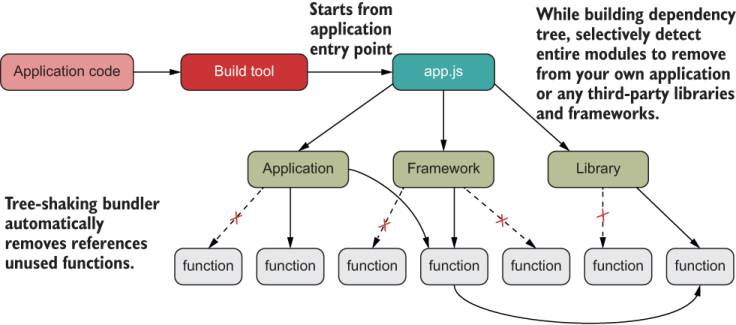
The dependency-tree figure illustrates how a bundler identifies unused modules and removes them from the packaged application. section 6.5.1
Modules also provide a context for asynchronous loading. import(...) loads a module asynchronously, and top-level await lets an ESM module wait without wrapping its code in an async function. A module that imports it must wait for that dependency to finish executing, so use this facility when the wait is necessary. section 6.4.3 section 8.6


































